
Fixing the InvalidLocationConstraint Error When Creating S3 Buckets with Boto3
If you’ve ever tried to create an Amazon S3 bucket using Boto3 and run into the following error, you’re not alone:
botocore.exceptions.ClientError: An error occurred (InvalidLocationConstraint)
when calling the CreateBucket operation: The specified location-constraint is not valid
This error can be especially confusing when you’re confident that your AWS region is correct and your code appears syntactically sound. In most cases, the problem has nothing to do with syntax at all—it’s a regional edge case.
Let’s break down what’s happening and how to fix it.
The Root Cause: us-east-1 Is Special
Amazon S3 behaves differently in us-east-1 (US East – N. Virginia) than in every other AWS region.
For all regions except one, you must explicitly specify a LocationConstraint when creating a bucket.
For us-east-1, you must not specify it.
If you do, AWS returns the InvalidLocationConstraint error—even if the value is “us-east-1”.
The Problematic Pattern
Here’s the pattern that causes the error when the region is us-east-1:
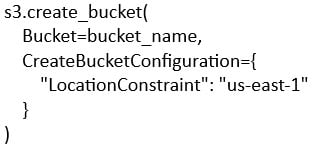
This works in every other region, but fails in us-east-1.
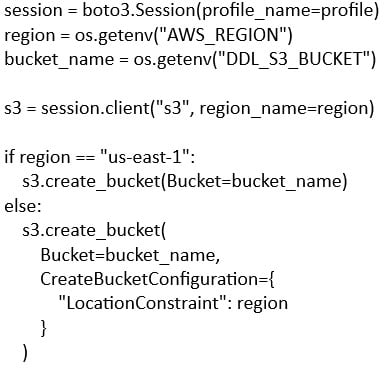
The Correct Approach
The fix is to conditionally include the CreateBucketConfiguration only when the region is not us-east-1.
Why AWS Does This
Historically, us-east-1 is the original S3 region. Buckets created there are implicitly assigned to the region, so specifying a location constraint is both unnecessary and invalid.
Every other region requires the constraint so AWS knows where to place the bucket.
Quick Reference
| Region | Include CreateBucketConfiguration |
| us-east-1 | ❌ No |
| Any other region | ✅ Yes |
Extra Tip: Match the Client Region Explicitly
Even if your environment variable is correct, it’s a good practice to explicitly pass the region when creating the S3 client:

This avoids surprises when profiles or default AWS configs specify a different region.
Takeaway
If you see InvalidLocationConstraint while creating an S3 bucket:
- Double-check whether you’re targeting us-east-1
- If you are, remove the CreateBucketConfiguration entirely
- Use conditional logic if your code needs to be region-agnostic
This small AWS quirk is easy to miss—but once you know it, the fix is straightforward.
Retiring Lawson, PeopleSoft, or Oracle? APIX archives the entire application — every table, every year, attachments and security included — into your own AWS account in about 30 days, so you can decommission the legacy system and keep full access to the history.

