
Running the Pre-Sync Data Check for Actor Data
If you are getting errors when provisioning users, these errors cannot be auto-corrected.
In SSOCONFIG, use the Data Check for Actor data which identifies errors that exist so you can fix them manually.
From the LSF server, run the ssoconfig utility.
ssoconfig -c- enter the ssoconfig utility password when prompted.
- select Manage Federation.
- select Perform Pre-Sync Data Check.
- Select Check Actor Data
- Review the output for errors. For an Actor record with missing or invalid email address, you will have to correct the errors manually.

- When you have finished correcting Actor errors, rerun the Pre-Sync Data Check to verify that all errors have been corrected.
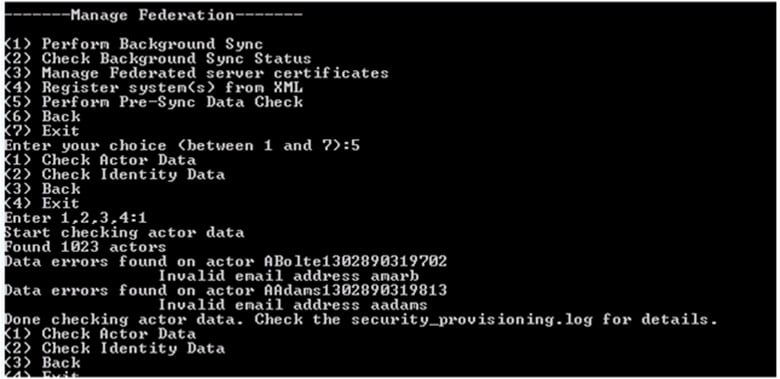
Results of the Pre-Sync Data Check are written to the security log file LAWDIR/system/security_provisioning.log
Retiring Lawson, PeopleSoft, or Oracle? APIX archives the entire application — every table, every year, attachments and security included — into your own AWS account in about 30 days, so you can decommission the legacy system and keep full access to the history.

