844-NOGALIS (844-664-2547)
Nogalis, Inc.
  • Link to Facebook
  • Link to X
  • Link to LinkedIn
  • Link to Mail
  • Company
    • News, Events and Articles
    • About Us
  • Products
    • Infor Lawson Data Archive
    • PeopleSoft Data Archive
    • Oracle Data Archive
  • Services
    • Infor Lawson Support
    • Infor Lawson / CloudSuite Consulting
  • Education & Training
  • Support
  • Contact Us
  • Click to open the search input field Click to open the search input field Search
  • Menu Menu

How to Update the ADFS Token-Signing Certificate

Articles, Frontpage Article, News

Lawson SSO issue

We are having an issue with ADFS SSO login with Lawson and I need someone to pull the updated metadata.

ADFS auto creates a new ‘secondary’ decrypt and signing cert 20 days prior to expiration so on 8/31-ish It then promotes the secondary to primary 5 days later so that would have been today.
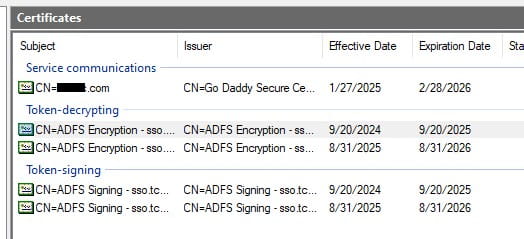
Update the ADFS Token-Signing Certificate

When the ADFS Token-Signing certificate is updated on the ADFS server, it will have to be imported to Lawson and Infor OS.

Someone with admin rights on the ADFS instance will need to export the certificate and provide you with the “.cer” file before these tasks can be completed.

Update the Certificate in Lawson

Log onto the Lawson Server

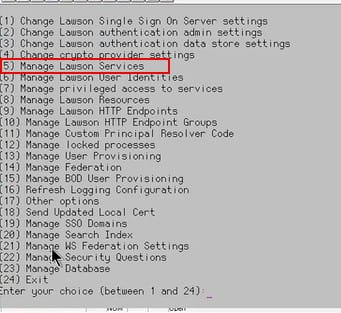
Start a ssoconfig -c session

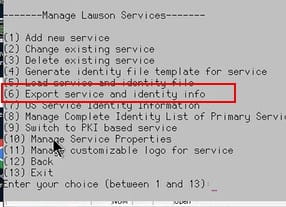
Export Services

  1. Select Manage Lawson services
  2. Select Export Services and Identity Info
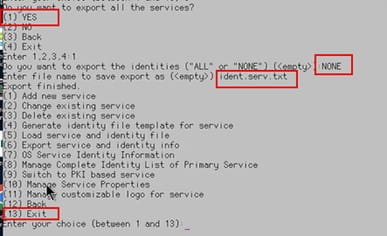
  3. Choose yes, for all services, None for identities and give it a file name

Check the file for the Service ID name and make a note of it

In this case, LSF_ADFS is the service name.

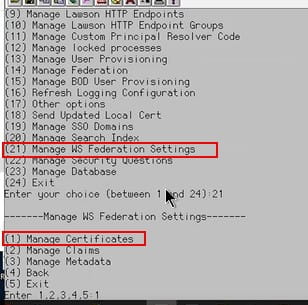
Go to “Manage WS Federation Settings” > “Manage Certificates”
Select “Delete WS Federation Certificate”

Select “Create certificate for “WS Federation”
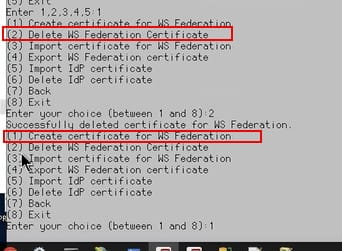
Select “Delete IdP certificate”

Enter the service name of your ADFS service
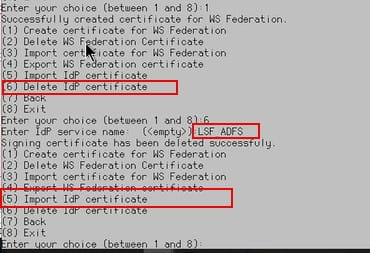
Select “Import IdP Certificate”

Enter the service name of your ADFS service

Provide the full path where you have the token-signing certificate saved
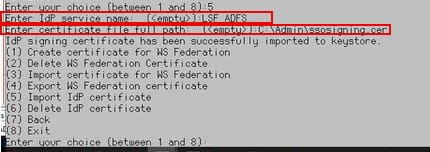
Verify External Portal work (goes through ADFS)

Update the Certificate in Infor OS

Log into the Infor OS server as the LAWSON user

go to STSAdminUI


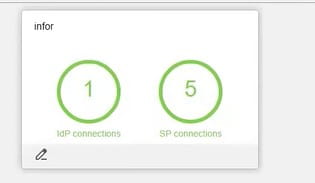
Click on idP Connections

click on Edit

Scroll down and you will see that the signing cert has changed
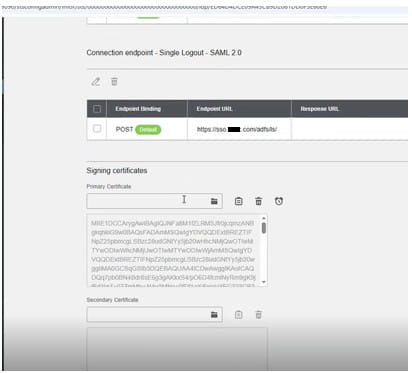
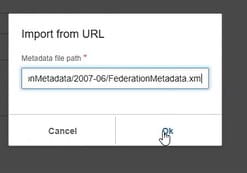
Go back to the top and click on the world
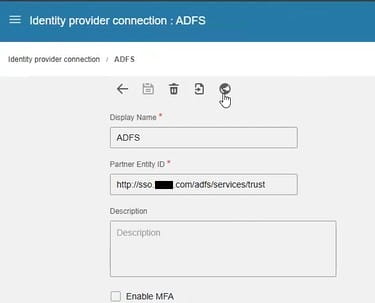
Enter the URL that Admin provided and click on OK
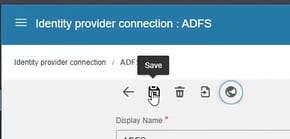
Click on save
Now test your connections


Retiring Lawson, PeopleSoft, or Oracle? APIX archives the entire application — every table, every year, attachments and security included — into your own AWS account in about 30 days, so you can decommission the legacy system and keep full access to the history.

See how the APIX ERP archive works →

05/15/2026
Share this entry
  • Share on Facebook
  • Share on X
  • Share on WhatsApp
  • Share on LinkedIn
  • Share on Reddit
  • Share by Mail
https://www.nogalis.com/wp-content/uploads/2026/05/How-to-Update-the-ADFS-Token-Signing-Certificate.jpg 470 470 Angeli Menta https://www.nogalis.com/wp-content/uploads/2013/04/logo-with-slogan-good.png Angeli Menta2026-05-15 08:21:142026-05-08 11:33:50How to Update the ADFS Token-Signing Certificate

LEGACY ERP DATA ARCHIVE SOLUTION


Discover how our clients are leveraging AWS services to archive their Legacy ERP data and provide ubiquitous access to users via a light-weight, secure, and read-only web interface. Secure, Fast, Reliable, and Cost Effective. That is the promise of APIX. Follow the link below to find out more and book a discovery call with our data archive specialist.

BOOK DEMO

© Copyright - Nogalis, Inc. 2026
  • Legal
  • Privacy
  • Contact Us
Link to: Enterprise AI Adoption Impact Index Finds More than Half of Businesses Struggle to Scale AI. New Infor Solutions Aim to Close the Gap Link to: Enterprise AI Adoption Impact Index Finds More than Half of Businesses Struggle to Scale AI. New Infor Solutions Aim to Close the Gap Enterprise AI Adoption Impact Index Finds More than Half of Businesses Struggle... Link to: Weekly Patch Notification: May 16, 2026 Link to: Weekly Patch Notification: May 16, 2026 Weekly Patch Notification: May 16, 2026
Scroll to top Scroll to top Scroll to top