
Lawson Async Administrator – How to view a system users IPA scheduled jobs
If you’re managing IPA flows daily, you may be used to working in Process Server Administrator. This gives you access to workunits, configuration sets, File Channels, among other features depending on your security.

Now if you’re logged into Process Server Admin as your own user, you don’t have access to scheduled IPA jobs. Creating new ones will tie them to your user, thus if you ever leave the organization, they all will fail. So, scheduling new IPA jobs under the system user require the system user password.
However, the good new is you could still edit these existing IPA scheduled jobs under the system user.
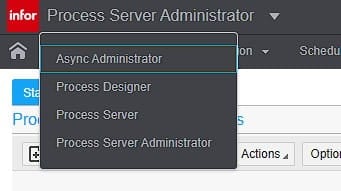
In order to edit them, you need to Async Administration Access, click the Process Server Admin drop down box and select Async Administration.
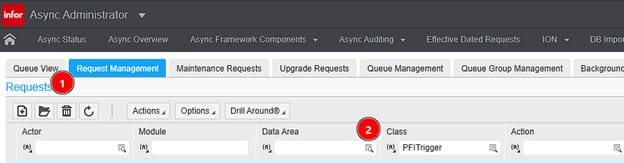
Select Request Management tab, then under Class, search PFITrigger and press enter
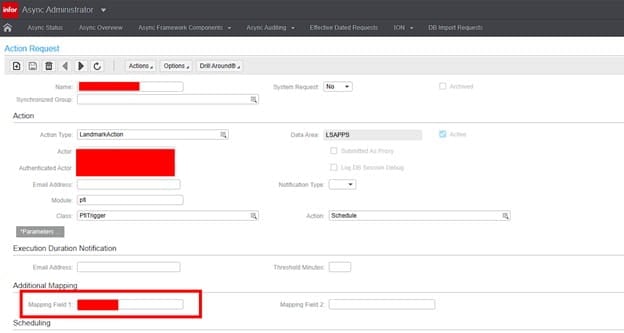
Now you will be able to view all the IPA Scheduled jobs, just double click them to view and edit them.
Note the Mapping field 1 will likely show the IPA Process Name since the job name may be named poorly.
Retiring Lawson, PeopleSoft, or Oracle? APIX archives the entire application — every table, every year, attachments and security included — into your own AWS account in about 30 days, so you can decommission the legacy system and keep full access to the history.

