
Configuring LSA logging for the passive client
Follow the steps below to configure LSA logging for the passive client:
- Right mouse Click on the Lawson Security Administrator icon and run as Administrator
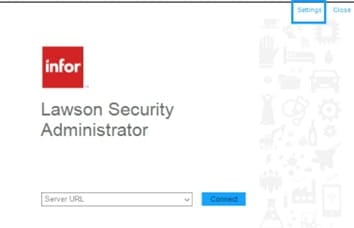
- On the upper right corner of the Server Connection form, click Settings.

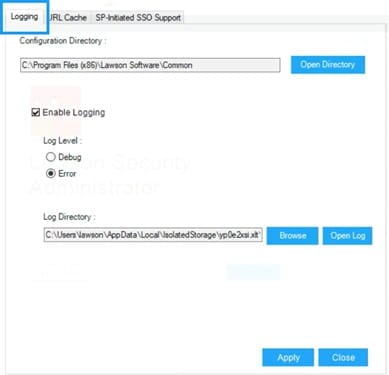
- On the Settings form, select the Logging tab then configure the following:

Configuration DirectorySpecify where LawsonNlog.Config is located. LawsonNlog.Config is the configuration setting for LawsonHttpClient that takes care of logging.
Enable Logging- toggle logging.
Log level
Debug – Log the detailed trace
Error – Log the exception errors
Log Directory
Provide the location where the generated logs will be saved on the same computer where LSA is installed.
- Select Apply, and Yes – to apply the settings before re-launching LSA.
Retiring Lawson, PeopleSoft, or Oracle? APIX archives the entire application — every table, every year, attachments and security included — into your own AWS account in about 30 days, so you can decommission the legacy system and keep full access to the history.

