
844-NOGALIS (844-664-2547)
Nogalis, Inc.
  • Link to Facebook
  • Link to X
  • Link to LinkedIn
  • Link to Mail
  • Company
    • News, Events and Articles
    • About Us
  • Products
    • Infor Lawson Data Archive
    • PeopleSoft Data Archive
    • Oracle Data Archive
  • Services
    • Infor Lawson Support
    • Infor Lawson / CloudSuite Consulting
  • Education & Training
  • Support
  • Contact Us
  • Click to open the search input field Click to open the search input field Search
  • Menu Menu

How to debug Lawson Business Intelligence (LBI) Report prompting Database Login

Articles, Frontpage Article, News

Learn how to debug Lawson Business Intelligence (LBI) Report prompting Database Login.


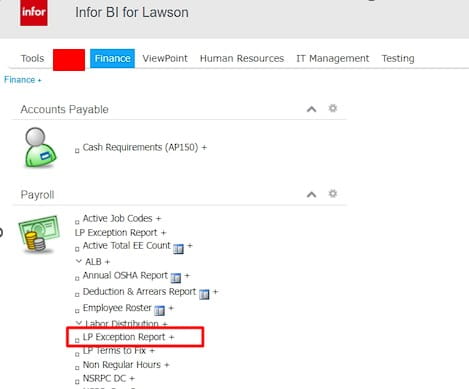
Here is an example issue when opening a report via LBI dashboard:
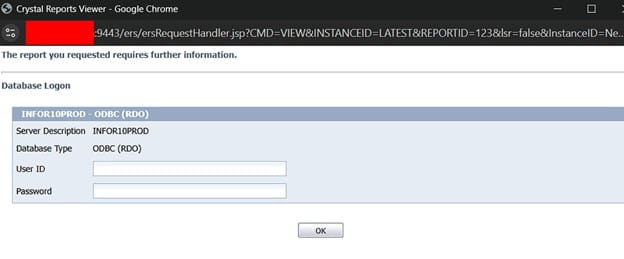
It prompts to a login screen and no credentials work:
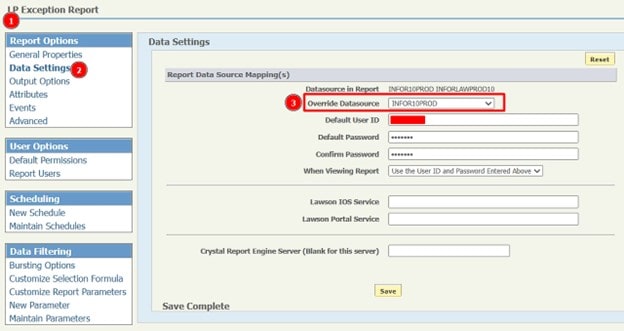
To solve this, first validate the datasource of the report and validate its correct (it may resolve after you click save and test the report again)
If not, see if you can view the report with Data Refresh
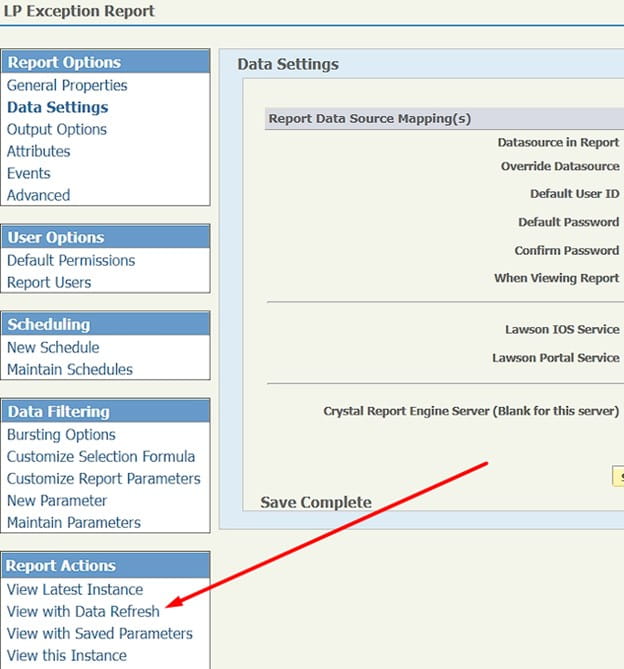
If it generates data, you can grab this URL:

Edit your report from the dashboard, in this example we edit the “LP Exception Report”:
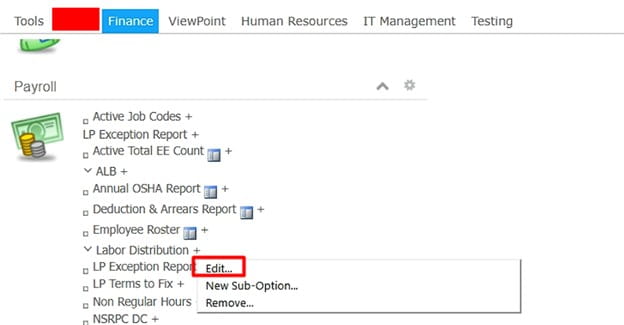
You can copy this URL:
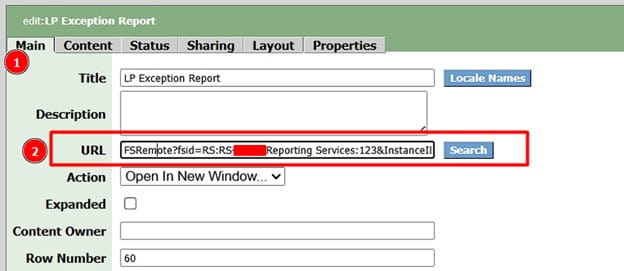
You can either replace it complete with the top URL shown below with the HTTPS://yourorg.domain.com…. Etc.

OR

You can modify the link with just the tail end of it as shown below:

Then copy and paste this URL back in and save:
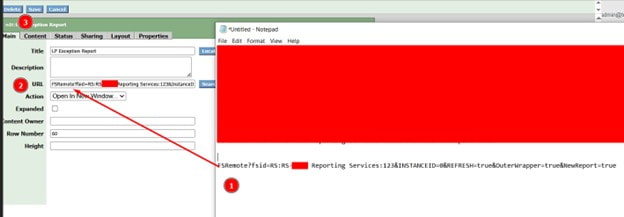
That’s it! Test it and the database login prompt should no longer show if you followed everything correctly.

If this is too complex for you and you need Lawson specialists to help manage your Lawson ERP system, Nogalis offers a team of consultants to help manage this for you under one MSP contract. Feel free to reach out to us to get a free consultation today.

Retiring Lawson, PeopleSoft, or Oracle? APIX archives the entire application — every table, every year, attachments and security included — into your own AWS account in about 30 days, so you can decommission the legacy system and keep full access to the history.

See how the APIX ERP archive works →

12/12/2025
Share this entry
  • Share on Facebook
  • Share on X
  • Share on WhatsApp
  • Share on LinkedIn
  • Share on Reddit
  • Share by Mail
https://www.nogalis.com/wp-content/uploads/2025/12/How-to-debug-Lawson-Business-Intelligence-Report-prompting-Database-Login.jpg 470 470 Angeli Menta https://www.nogalis.com/wp-content/uploads/2013/04/logo-with-slogan-good.png Angeli Menta2025-12-12 08:01:182025-12-08 12:09:49How to debug Lawson Business Intelligence (LBI) Report prompting Database Login

LEGACY ERP DATA ARCHIVE SOLUTION


Discover how our clients are leveraging AWS services to archive their Legacy ERP data and provide ubiquitous access to users via a light-weight, secure, and read-only web interface. Secure, Fast, Reliable, and Cost Effective. That is the promise of APIX. Follow the link below to find out more and book a discovery call with our data archive specialist.

BOOK DEMO

© Copyright - Nogalis, Inc. 2026
  • Legal
  • Privacy
  • Contact Us
Link to: The 8 Data Trends That Will Define 2026 Link to: The 8 Data Trends That Will Define 2026 The 8 Data Trends That Will Define 2026 Link to: Data Benefits AI; AI Benefits Data Link to: Data Benefits AI; AI Benefits Data Data Benefits AI; AI Benefits Data
Scroll to top Scroll to top Scroll to top