
Mass remove candidates or suppliers and their identities from LSF
Candidates and suppliers from Landmark applications should not be synced to LSF. Services which allow users to register externally are services that should NOT be synced. If they were synced to LSF, follow the steps below to remove user and identity records from LSF.
Configure sync service lists to exclude candidates from sync – This process should be used if possible
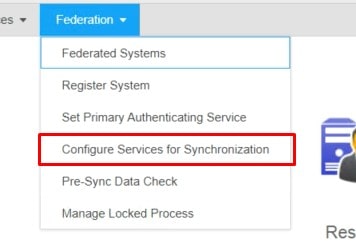
Use Configure Services for Synchronization menu in ISS
Manual Sync service list configuration – This process may be used if not all services are shown in ISS
Export list of all services from LMK
secadm -p <secadmpassword> service list
The list outputs to the screen –copy the list from the screen into a text document
Determine which services from each system you DO want synced
Configure sync service lists for LSF and LMK in the LSF by adding the following lines to LAWDIR/system/lsservice.properties file:
fed.LSFSERVERNAME.DOMAIN.COM;40000;40001;LSF. syncServiceList=YourListofLSFServicesToSync,SeparatedByCommas,NoSpaces fed.LMKSERVERNAME.DOMAIN.COM;10888;11888;LANDMARK. syncServiceList=YourListofLMKServicesToSync,SeparatedByCommas,NoSpaces
Save changes and close lsservice.properties
Restart LSF and WAS
Configure tuning for sync*
- Add the following line to the LAWDIR/system/lsservice.properties
file: Nthread=5
This value can be any number between 2 and 10. You can tweak the Nthread parameter until you find the optimized setting for your system. Do not go above 10 unless directed by Infor.
- Adjust lase GRID node max heap to at least 3096
From the Grid Management main page go to Configuration Manager->Applications->Application->Landmark and the select the environment.
Select “Edit Properties.”
Under Grid Defined Properties -> Node Memory, select “Max Heap.”
Adjust the lase node memory to 3096 and then click Save
It may be set higher if number of users/identities indicates
-Restart the node for this environment or restart Landmark.
Retiring Lawson, PeopleSoft, or Oracle? APIX archives the entire application — every table, every year, attachments and security included — into your own AWS account in about 30 days, so you can decommission the legacy system and keep full access to the history.

