
844-NOGALIS (844-664-2547)
Nogalis, Inc.
  • Link to Facebook
  • Link to X
  • Link to LinkedIn
  • Link to Mail
  • Company
    • News, Events and Articles
    • About Us
  • Products
    • Infor Lawson Data Archive
    • PeopleSoft Data Archive
    • Oracle Data Archive
  • Services
    • Infor Lawson Support
    • Infor Lawson / CloudSuite Consulting
  • Education & Training
  • Support
  • Contact Us
  • Click to open the search input field Click to open the search input field Search
  • Menu Menu

Resolving the Error “Program Does Not Allow INVOKE”

Articles, Frontpage Article, News

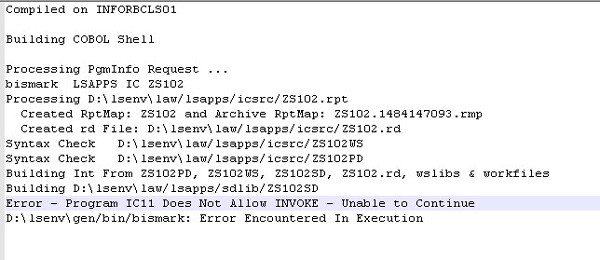
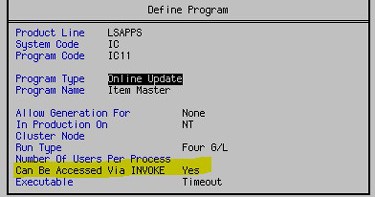
If you are compiling a form that generates an error “Program X Does Not Allow INVOKE”, that means that the invoked program needs to be set to allow invoke.  To do that, from a LID session, go to the form in pgmdef (pgmdef <prodline> <system code>).  Select Define (F6) > Program (A).  Set the property “Can Be Accessed Via INVOKE” to Yes.  Compile the invoked form and then compile the custom form that does the invoking.
 

Define (F6) > Program (A)
 

This is an update to an older version of this article, which can be found here.

If you found this article helpful, Nogalis provides managed services and expert technical resources to assist with Lawson patching and system maintenance. Let us help ensure your patches are applied efficiently and your system is running smoothly. Contact us to learn more about how we can support your Lawson environment.

Retiring Lawson, PeopleSoft, or Oracle? APIX archives the entire application — every table, every year, attachments and security included — into your own AWS account in about 30 days, so you can decommission the legacy system and keep full access to the history.

See how the APIX ERP archive works →

07/18/2025
Share this entry
  • Share on Facebook
  • Share on X
  • Share on WhatsApp
  • Share on LinkedIn
  • Share on Reddit
  • Share by Mail
https://www.nogalis.com/wp-content/uploads/2025/07/Resolving-the-Error-Program-Does-Not-Allow-INVOKE.jpg 470 470 Angeli Menta https://www.nogalis.com/wp-content/uploads/2013/04/logo-with-slogan-good.png Angeli Menta2025-07-18 08:28:202025-07-15 11:33:30Resolving the Error “Program Does Not Allow INVOKE”

LEGACY ERP DATA ARCHIVE SOLUTION


Discover how our clients are leveraging AWS services to archive their Legacy ERP data and provide ubiquitous access to users via a light-weight, secure, and read-only web interface. Secure, Fast, Reliable, and Cost Effective. That is the promise of APIX. Follow the link below to find out more and book a discovery call with our data archive specialist.

BOOK DEMO

© Copyright - Nogalis, Inc. 2026
  • Legal
  • Privacy
  • Contact Us
Link to: How To Calculate The ROI Of Your ERP Implementation Link to: How To Calculate The ROI Of Your ERP Implementation How To Calculate The ROI Of Your ERP Implementation Link to: Weekly Patch Notification: July 19, 2025 Link to: Weekly Patch Notification: July 19, 2025 Weekly Patch Notification: July 19, 2025
Scroll to top Scroll to top Scroll to top