844-NOGALIS (844-664-2547)
Nogalis, Inc.
  • Link to Facebook
  • Link to X
  • Link to LinkedIn
  • Link to Mail
  • Company
    • News, Events and Articles
    • About Us
  • Products
    • Infor Lawson Data Archive
    • PeopleSoft Data Archive
    • Oracle Data Archive
  • Services
    • Infor Lawson Support
    • Infor Lawson / CloudSuite Consulting
  • Education & Training
  • Support
  • Contact Us
  • Click to open the search input field Click to open the search input field Search
  • Menu Menu

How to Analyze a Cloud-based Log Quickly in Lawson

Articles, Frontpage Article, News

In a Lawson Cloud environment, its difficult to get logs off the server since now you’re likely restricted to FTP access and the latest logs are currently being written to by the server itself, thus throwing a deny exception when trying to download the latest logs from FTP.

I previously made another article on this explaining a work around for this but that takes a few extra steps and time. This is a quicker command line method if you need to test something immediately.


  1. First login to Lawson Interface Desktop
  2. Go to the directory in which the logs exist
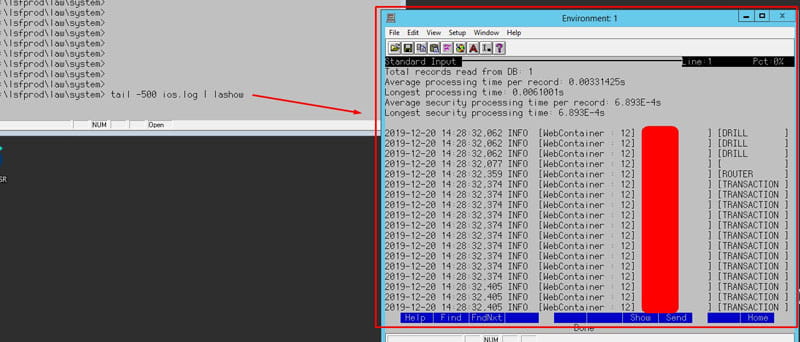
  3. Type this command: tail -500 <name of log file being written to> | lashow
  4. Example: tail -500 ios.log | lashow

As you see above, this uses the tail command combined with -500 parameter which returns the last 500 lines written to the log. You can change -500 to whatever amount of lines you want to return (the more the longer it takes to load)

The optional piped LASHOW command is to open this in a separate scrollable and searchable window within LID.

This becomes especially useful when testing live forms or code in Lawson.

If you found this article helpful, Nogalis offers expert managed services to optimize your Infor Cloudsuite or Lawson environment. From troubleshooting log issues to streamlining processes, we provide tailored support to keep your system running efficiently. Contact us to learn how we can enhance your Lawson Cloud experience without the overhead of full-time staff.

Retiring Lawson, PeopleSoft, or Oracle? APIX archives the entire application — every table, every year, attachments and security included — into your own AWS account in about 30 days, so you can decommission the legacy system and keep full access to the history.

See how the APIX ERP archive works →

07/11/2025
Share this entry
  • Share on Facebook
  • Share on X
  • Share on WhatsApp
  • Share on LinkedIn
  • Share on Reddit
  • Share by Mail
https://www.nogalis.com/wp-content/uploads/2020/01/How-to-Analyze-a-Cloud-based-Log-Quickly-in-Lawson.jpg 470 470 Angeli Menta https://www.nogalis.com/wp-content/uploads/2013/04/logo-with-slogan-good.png Angeli Menta2025-07-11 08:20:322026-09-11 11:50:28How to Analyze a Cloud-based Log Quickly in Lawson

LEGACY ERP DATA ARCHIVE SOLUTION


Discover how our clients are leveraging AWS services to archive their Legacy ERP data and provide ubiquitous access to users via a light-weight, secure, and read-only web interface. Secure, Fast, Reliable, and Cost Effective. That is the promise of APIX. Follow the link below to find out more and book a discovery call with our data archive specialist.

BOOK DEMO

© Copyright - Nogalis, Inc. 2026
  • Legal
  • Privacy
  • Contact Us
Link to: The ERP paradox: How digital transformation reinforces CFOs as data gatekeepers Link to: The ERP paradox: How digital transformation reinforces CFOs as data gatekeepers The ERP paradox: How digital transformation reinforces CFOs as data gatekee... Link to: Weekly Patch Notification: July 12, 2025 Link to: Weekly Patch Notification: July 12, 2025 Weekly Patch Notification: July 12, 2025
Scroll to top Scroll to top Scroll to top