
844-NOGALIS (844-664-2547)
Nogalis, Inc.
  • Link to Facebook
  • Link to X
  • Link to LinkedIn
  • Link to Mail
  • Company
    • News, Events and Articles
    • About Us
  • Products
    • Infor Lawson Data Archive
    • PeopleSoft Data Archive
    • Oracle Data Archive
  • Services
    • Infor Lawson Support
    • Infor Lawson / CloudSuite Consulting
  • Education & Training
  • Support
  • Contact Us
  • Click to open the search input field Click to open the search input field Search
  • Menu Menu

Downloading Logs for review in a Lawson Cloud Environment

Articles, Frontpage Article, News

In Lawson v10, Admin users would have direct access to system logs but in the cloud, you’re access is limited to FTP access.

Problem: Reviewing IOS and LADB logs live is more difficult through FTP since you’re unable to download or view a file that is currently being written to. To get around this you simply use the copy line command or cp.


To understand this process, follow the steps below:

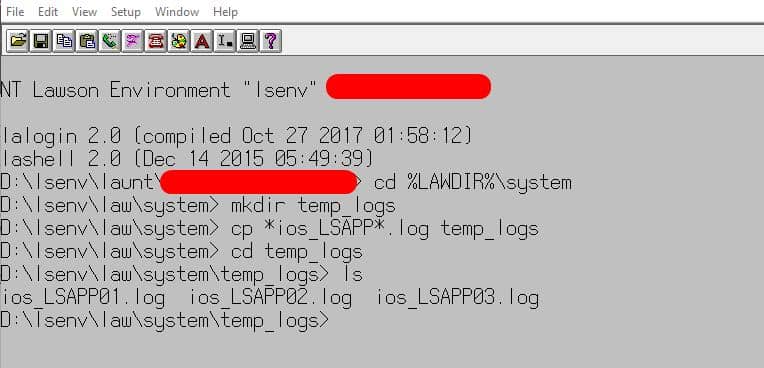
Step 1: Open LID and connect to the Lawson environment you want to access logs from.


Step 2: Go to %LAWDIR%\system directory


Step 3: Create a new folder in %LAWDIR%\system directory, command is: mkdir temp_logs (this will create a folder called temp_logs)


Step 4: In %LAWDIR%\system type this command (change based on your log names):

cp *ios_lsapp*.log temp_logs


Step 5: Go to %LAWDIR%\system\temp_logs and run the ls command to view your copied log files or simply download them from the FTP.


Here is a screenshot of my results:
If you found this article helpful, Nogalis offers expert technical resources for managing Lawson Cloud environments. Whether you’re dealing with FTP restrictions or need assistance with accessing logs, our team is here to provide guidance and support. Contact us to learn more about how we can assist with your Lawson system needs.

Retiring Lawson, PeopleSoft, or Oracle? APIX archives the entire application — every table, every year, attachments and security included — into your own AWS account in about 30 days, so you can decommission the legacy system and keep full access to the history.

See how the APIX ERP archive works →

06/10/2025
Share this entry
  • Share on Facebook
  • Share on X
  • Share on WhatsApp
  • Share on LinkedIn
  • Share on Reddit
  • Share by Mail
https://www.nogalis.com/wp-content/uploads/2019/12/Downloading-Logs-for-review-in-a-Lawson-Cloud-Environment.jpg 470 470 Angeli Menta https://www.nogalis.com/wp-content/uploads/2013/04/logo-with-slogan-good.png Angeli Menta2025-06-10 08:33:232026-09-11 11:54:12Downloading Logs for review in a Lawson Cloud Environment

LEGACY ERP DATA ARCHIVE SOLUTION


Discover how our clients are leveraging AWS services to archive their Legacy ERP data and provide ubiquitous access to users via a light-weight, secure, and read-only web interface. Secure, Fast, Reliable, and Cost Effective. That is the promise of APIX. Follow the link below to find out more and book a discovery call with our data archive specialist.

BOOK DEMO

© Copyright - Nogalis, Inc. 2026
  • Legal
  • Privacy
  • Contact Us
Link to: Riverina Water Achieves Stellar Results from Infor CloudSuite Public Sector Deployment Link to: Riverina Water Achieves Stellar Results from Infor CloudSuite Public Sector Deployment Riverina Water Achieves Stellar Results from Infor CloudSuite Public Sector... Link to: Why It’s So Hard to Modernize Your Outdated ERP Link to: Why It’s So Hard to Modernize Your Outdated ERP Why It’s So Hard to Modernize Your Outdated ERP
Scroll to top Scroll to top Scroll to top