

Adding Context Apps in Infor OS Portal
Follow the steps below to add a new context app in Infor OS Portal. In this example, we will enable the app for Infor Lawson S3.
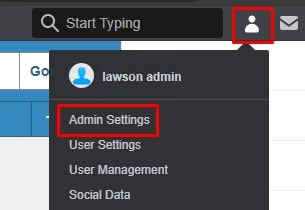
Log into Infor Portal and Click on User Settings > Admin Settings
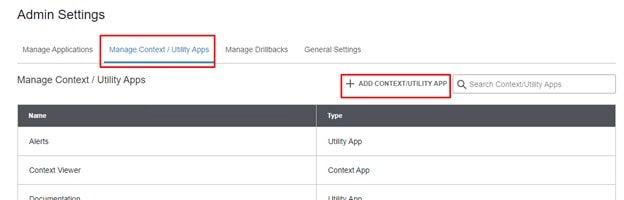
Go to the Manage Context / Utility Apps tab and select “ADD CONTEXT/UTILITY APP”
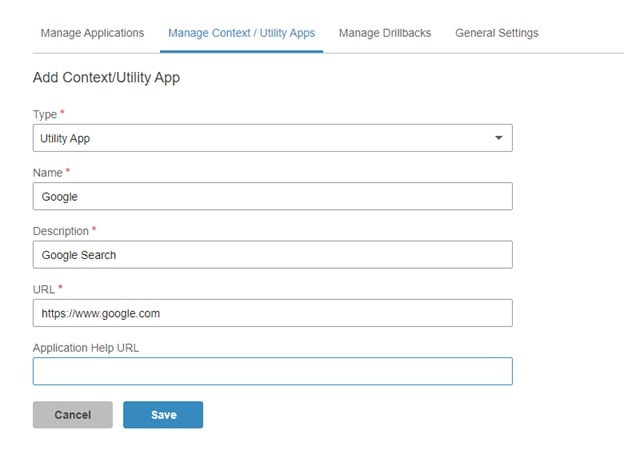
Enter a Type, Name, Description, and URL. Click Save.
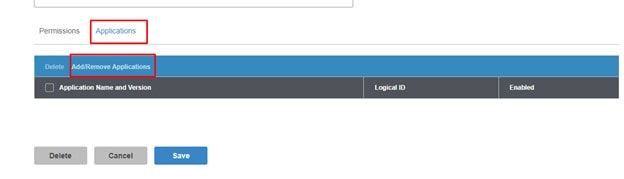
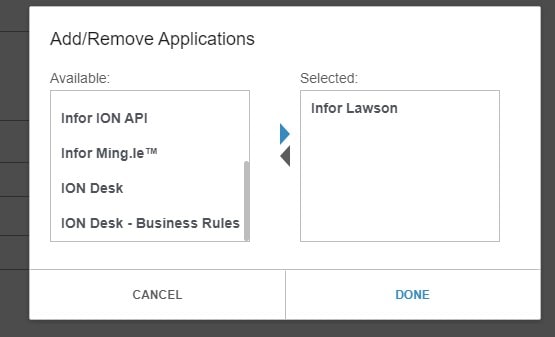
Now, add the application(s) that will be using this context app. At the bottom of the screen, select the Applications tab and select “Add/Remove Applications”.
Select the application(s) and click Done
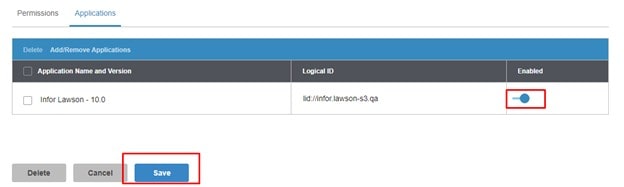
Be sure to Enable to application and then click “Save”
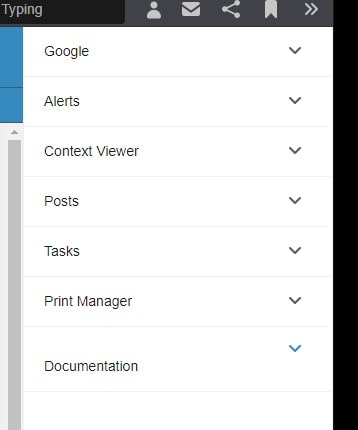
Your context app now shows up in the right side menu
Retiring Lawson, PeopleSoft, or Oracle? APIX archives the entire application — every table, every year, attachments and security included — into your own AWS account in about 30 days, so you can decommission the legacy system and keep full access to the history.


Leave a Reply
Want to join the discussion?Feel free to contribute!