
Increasing the WebSphere timeout for Web Run in IPA
In an IPA process that runs a batch job using a Web Run node, and you get the message “An unknown error occurred” in the Work Unit Log, the next step should be to check the IOS.log. If you see the message “javax.transaction.TransactionRolledbackException: Transaction is ended due to timeout”, you need to increase the timeout in WebSphere.
Sample Error: WU Log
Activity name:WebRun9710 id:1 started @ 06/28/2024 02:30:15.993 AM
WebRun WebRun9710: Executing WebRun activity node
WebRun WebRun9710: call type Lawson HTTP Call
WebRun WebRun9710: calling host https://server.company.com:1447 (Req timeout: 60 min; # Retries: 3; Pause: 1,000 ms) web program cgi-lawson/jobrun.exe?FUNC=run&USER=NA%5Crlawjob&JOB=AP136-02&WAIT=true&OUT=XML
WebRun WebRun9710: Post string
WebRun WebRun9710: WebRun result size: 0.00 MiB
WebRun9710_result = <?xml version=”1.0″ encoding=”ISO-8859-1″?>
<ERROR key=”UNKNOWN_ERROR” level=”1″><MSG><![CDATA[ An unknown error occurred. Please contact your system admin. ]]></MSG><DETAILS><![CDATA[ Check IOS logs for details. ]]></DETAILS></ERROR>
WebRun WebRun9710: Success string <STATUS>63</STATUS> not found
WebRun9710_errorCode = 1
WebRun9710_informationCode = 0
WebRun9710_returnMessage = WebRun WebRun9710: Success string <STATUS>63</STATUS> not found
WebRun9710_outputData =
Activity name:WebRun9710 id:1 failed @ 06/28/2024 02:44:51.452 AM
Sample Error: Ios.log
2024-06-28T02:44:51,403 ERROR [WebContainer : 1] [ ][lawson ] [CGI-LAWSON ] [Cgilawson] Exception occurred while processing CGI invocation.
javax.ejb.EJBTransactionRolledbackException: Transaction rolled back; nested exception is: javax.transaction.TransactionRolledbackException: Transaction is ended due to timeout
at com.ibm.ejs.container.BusinessExceptionMappingStrategy.mapCSIException(BusinessExceptionMappingStrategy.java:167) ~[com.ibm.ws.runtime.jar:?]
at com.ibm.ejs.container.BusinessExceptionMappingStrategy.mapCSITransactionRolledBackException(BusinessExceptionMappingStrategy.java:618) ~[com.ibm.ws.runtime.jar:?]
at com.ibm.ejs.container.EJSDeployedSupport.mapCSITransactionRolledBackException(EJSDeployedSupport.java:711) ~[com.ibm.ws.runtime.jar:?]
at com.ibm.ejs.container.EJSContainer.postInvokeRolledbackException(EJSContainer.java:4900) ~[com.ibm.ws.runtime.jar:?]
at com.ibm.ejs.container.EJSContainer.postInvoke(EJSContainer.java:4586) ~[com.ibm.ws.runtime.jar:?]
at com.lawson.ios.services.CGI.EJSLocal0SLCGIServiceBean_7f987149.invoke(EJSLocal0SLCGIServiceBean_7f987149.java) ~[?:?]
at com.lawson.servlet.Cgilawson.doService(Cgilawson.java:105) [classes/:?]
Steps to Resolve
- Access the LSF WebSphere Administration/Integrated Solutions Console.
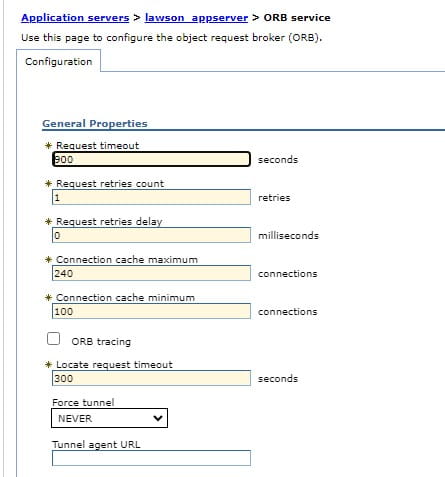
2. Navigate to Servers > Server Types > WebSphere Application Servers > {LSF Application Server} > Container Services > ORB service.
3. In the Request timeout field type 900 (equates to 15 minutes)
4. In the Locate request timeoutfield type 300 (which is the maximum value allowed for this field).
5. Click OK.
6. Save the changes to the master configuration.
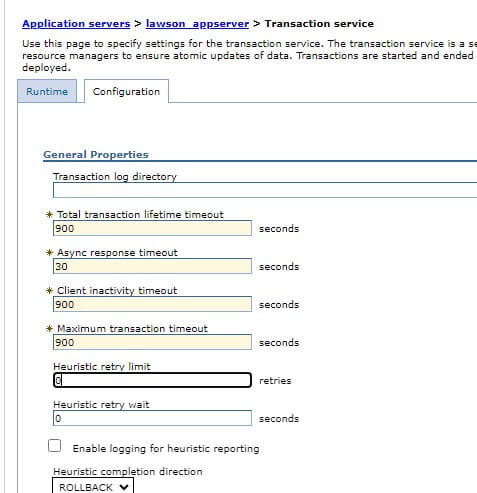
7. Navigate to Servers > Server Types > WebSphere Application Servers > {LSF Application Server} > Container Services > Transaction service.
8. In the Total transaction lifetime timeout field type 900
9. In the Client Inactivity timeoutfield, type 900
10. In the Maximum transaction timeout field, type 900
11. Click OK.
12. Save the changes to the master configuration.
13. Restart the LSF application server for the changes to take effect.
Retiring Lawson, PeopleSoft, or Oracle? APIX archives the entire application — every table, every year, attachments and security included — into your own AWS account in about 30 days, so you can decommission the legacy system and keep full access to the history.


Leave a Reply
Want to join the discussion?Feel free to contribute!