
844-NOGALIS (844-664-2547)
Nogalis, Inc.
  • Link to Facebook
  • Link to X
  • Link to LinkedIn
  • Link to Mail
  • Company
    • News, Events and Articles
    • About Us
  • Products
    • Infor Lawson Data Archive
    • PeopleSoft Data Archive
    • Oracle Data Archive
  • Services
    • Infor Lawson Support
    • Infor Lawson / CloudSuite Consulting
  • Education & Training
  • Support
  • Contact Us
  • Click to open the search input field Click to open the search input field Search
  • Menu Menu

How to set a distribution group to a Lawson job within Lawson portal

Articles, Frontpage Article, News

Before we get started, you’ll need to have distribution groups setup already. See our article on how to do that if you haven’t. You’ll likely need higher privileged access to perform these tasks.

Assuming you already have distribution groups setup, follow the steps below.

  1. Login to Lawson portal.
  2. Go to a Lawson job that you want to set a distribution group for.
  3. Once the job is created, click on the “Reports” button above the Job Name.
  4. In Report Properties, select Distribution Group and then select one of your created distribution groups from the Group Name drop down box and press OK when done.
  5. Click “Change” to save the report properties. Now Inquire on the job and click Reports again to verify the changes were made.
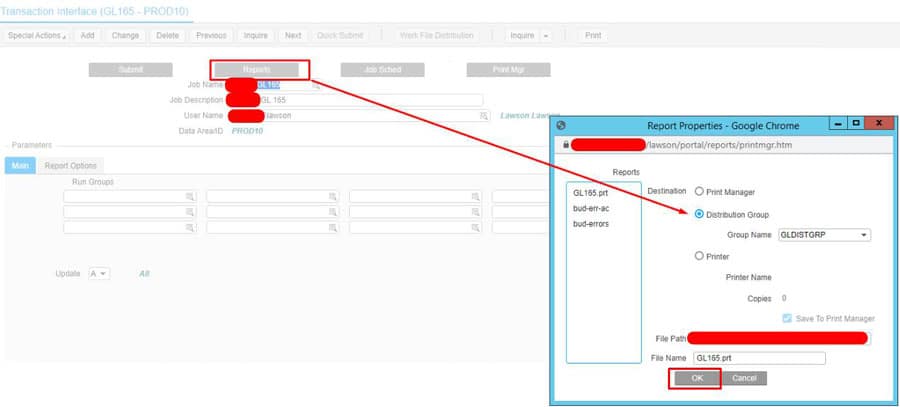
That is, your reports will now show up in the users print manager that are in the selected distribution group. All without having to go to LID.


If this task is crucial for your organization’s ongoing operations and requires expert organization and proactive management without the need for a full-time or on-site staff, Nogalis offers specialized consultant services. Our team of experts excels in maintaining and optimizing Lawson systems, providing proactive support tailored to your specific needs. Explore how Nogalis can improve your operational efficiency by contacting us through our dedicated contact page.

Retiring Lawson, PeopleSoft, or Oracle? APIX archives the entire application — every table, every year, attachments and security included — into your own AWS account in about 30 days, so you can decommission the legacy system and keep full access to the history.

See how the APIX ERP archive works →

01/10/2025
Share this entry
  • Share on Facebook
  • Share on X
  • Share on WhatsApp
  • Share on LinkedIn
  • Share on Reddit
  • Share by Mail
https://www.nogalis.com/wp-content/uploads/2021/08/How-to-set-a-distribution-group-to-a-Lawson-job-within-Lawson-portal-min.jpg 470 470 Angeli Menta https://www.nogalis.com/wp-content/uploads/2013/04/logo-with-slogan-good.png Angeli Menta2025-01-10 08:38:122026-09-11 12:14:45How to set a distribution group to a Lawson job within Lawson portal

LEGACY ERP DATA ARCHIVE SOLUTION


Discover how our clients are leveraging AWS services to archive their Legacy ERP data and provide ubiquitous access to users via a light-weight, secure, and read-only web interface. Secure, Fast, Reliable, and Cost Effective. That is the promise of APIX. Follow the link below to find out more and book a discovery call with our data archive specialist.

BOOK DEMO

© Copyright - Nogalis, Inc. 2026
  • Legal
  • Privacy
  • Contact Us
Link to: The challenge of managing enterprise storage in a hybrid world Link to: The challenge of managing enterprise storage in a hybrid world The challenge of managing enterprise storage in a hybrid world Link to: Weekly Patch Notification: January 11, 2025 Link to: Weekly Patch Notification: January 11, 2025 Weekly Patch Notification: January 11, 2025
Scroll to top Scroll to top Scroll to top