
844-NOGALIS (844-664-2547)
Nogalis, Inc.
  • Link to Facebook
  • Link to X
  • Link to LinkedIn
  • Link to Mail
  • Company
    • News, Events and Articles
    • About Us
  • Products
    • Infor Lawson Data Archive
    • PeopleSoft Data Archive
    • Oracle Data Archive
  • Services
    • Infor Lawson Support
    • Infor Lawson / CloudSuite Consulting
  • Education & Training
  • Support
  • Contact Us
  • Click to open the search input field Click to open the search input field Search
  • Menu Menu

How to search for a Lawson users identity info in Jxplorer

Articles, Frontpage Article, News

Searching JXplorer can be cumbersome when you have thousands of Lawson users and possible issues with “rogue” or “orphaned” identities being stored when trying to update identity information.

Below we are going to show how you can easily search for this information vs manually scanning thousands of users.


First Select the part of the LDAP tree to search from:
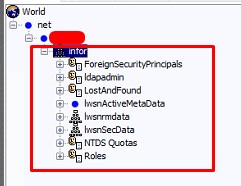
CTRL + F


Notice the “Starting Searching From” field, this search will search all trees below this.

Now go into your Text Filter tab and type in parenthesis the field and value you want, click search
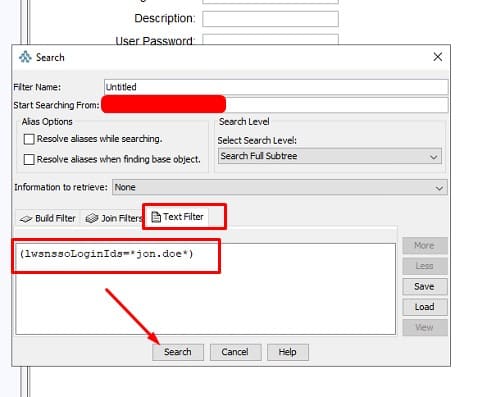
 

It will automatically switch to the Results field and show your results:
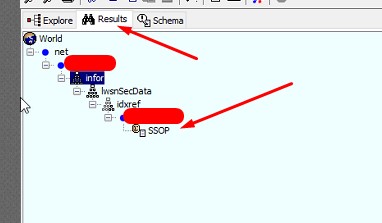
You can then do another search within these results or go back to Explorer tab and CTRL+F again and it will bring your previous search up.

You can also get creative and search multiple fields and values with an “OR” search:

(|(cn=*jon.doe*)(mail=*jon.doe*)(uid=*jon.doe*)(lwsnssoListOfIDs=*jon.doe*))

This is an AND search:

(&(cn=*jon.doe*)(mail=*jon.doe*)(uid=*jon.doe*)(lwsnssoListOfIDs=*jon.doe*))


The | means OR, & means AND. So each field cn, mail, uid etc. have to all bring back a result for it to work. It’s best to use an OR search on average.

Remember, you can also save your searches:
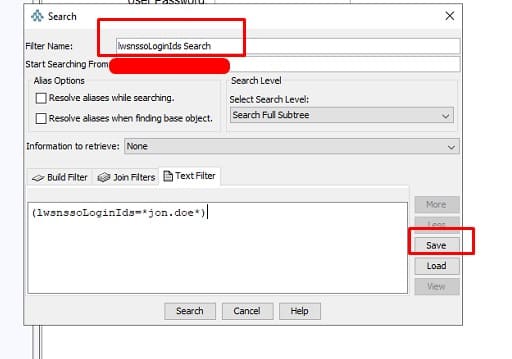
As mentioned above, this is especially useful when finding users in JXplorer to remove any duplicate or “orphaned” RMIDs and Identities not showing up in Lawson Security.


Good luck!

Retiring Lawson, PeopleSoft, or Oracle? APIX archives the entire application — every table, every year, attachments and security included — into your own AWS account in about 30 days, so you can decommission the legacy system and keep full access to the history.

See how the APIX ERP archive works →

11/15/2024
Share this entry
  • Share on Facebook
  • Share on X
  • Share on WhatsApp
  • Share on LinkedIn
  • Share on Reddit
  • Share by Mail
https://www.nogalis.com/wp-content/uploads/2024/11/How-to-search-for-a-Lawson-users-identity-info-in-Jxplorer.jpg 470 470 Angeli Menta https://www.nogalis.com/wp-content/uploads/2013/04/logo-with-slogan-good.png Angeli Menta2024-11-15 07:58:172024-11-12 15:07:09How to search for a Lawson users identity info in Jxplorer
0 replies

Leave a Reply

Want to join the discussion?
Feel free to contribute!

Leave a Reply

You must be logged in to post a comment.

LEGACY ERP DATA ARCHIVE SOLUTION


Discover how our clients are leveraging AWS services to archive their Legacy ERP data and provide ubiquitous access to users via a light-weight, secure, and read-only web interface. Secure, Fast, Reliable, and Cost Effective. That is the promise of APIX. Follow the link below to find out more and book a discovery call with our data archive specialist.

BOOK DEMO

© Copyright - Nogalis, Inc. 2026
  • Legal
  • Privacy
  • Contact Us
Link to: Maximizing cybersecurity ROI: Best practices for CISOs today Link to: Maximizing cybersecurity ROI: Best practices for CISOs today Maximizing cybersecurity ROI: Best practices for CISOs today Link to: Weekly Patch Notification: November 16, 2024 Link to: Weekly Patch Notification: November 16, 2024 Weekly Patch Notification: November 16, 2024
Scroll to top Scroll to top Scroll to top