
Check the WAS Server status
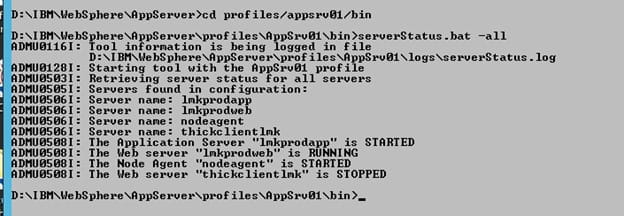
There is a simple way to check the WAS Server status. First, open the command (cmd) prompt. The command to check which servers are running in WAS is in WAS_HOME/profiles/<profile>/bin. To check all the servers, supply the switch “-all”. Otherwise, provide a server name. See the screenshot below for a visual reference for checking the status of your WAS Server.
Retiring Lawson, PeopleSoft, or Oracle? APIX archives the entire application — every table, every year, attachments and security included — into your own AWS account in about 30 days, so you can decommission the legacy system and keep full access to the history.


Leave a Reply
Want to join the discussion?Feel free to contribute!