
Lawson Security Administrator Reports Stuck
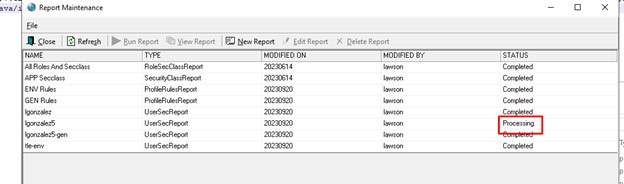
If your Lawson Security Administrator (LSA) reports are getting stuck in the “processing” status, then there is a quick and simple solution for this.
All you need to do is open the path: LAWDIR/gen/java/comman/lsserver.properties. Next, on the ljx.ext.dirs line, you will need to manually add the following command: “${GENDIR}/java/impl”.
Then you just have to bounce Lawson services, or simply reboot the server. Once booted up again you will see that the “processing” status should be gone and the status should change to “completed”. You can refer to the screenshots below for a visual guide. That’s all there is to it!

Retiring Lawson, PeopleSoft, or Oracle? APIX archives the entire application — every table, every year, attachments and security included — into your own AWS account in about 30 days, so you can decommission the legacy system and keep full access to the history.


Leave a Reply
Want to join the discussion?Feel free to contribute!