
How to delete unwanted Lawson AP Batches
So, you have some Lawson AP batches (AP25.1) that you can’t release or delete? We can fix that.
Resolution:
There’s a simple solution for this instance. You can easily delete these batches in AP25.2.
First, you will need to enter the company and batch number and then click Inquire:
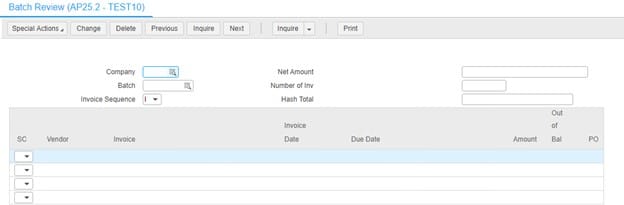
After you successfully inquire, select the delete button (If it doesn’t appear it may be in a drop down on the top bar).
You will also need the proper change access to perform this so if you’re receiving a security violation or don’t see the delete button, you don’t have the proper access.
Good luck!
Retiring Lawson, PeopleSoft, or Oracle? APIX archives the entire application — every table, every year, attachments and security included — into your own AWS account in about 30 days, so you can decommission the legacy system and keep full access to the history.


Leave a Reply
Want to join the discussion?Feel free to contribute!