

How to load bursting rights into Lawson Business Intelligence
So, you have a list of users with several LBI bursting rights. Manually doing this is common but prone to mistakes while also timely. This is where loading a file into LBI is more efficient.
- First let’s build a template file in excel (this can be used over and over again in the future).
- You’ll need to know how structures are setup in your LBI system since this will vary
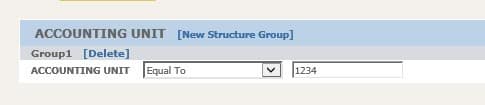
- In this example we have an ACCOUNTING UNIT structure that is equal to a number value, ours is 4 digits.

- I will explain each column in order of your template file

- Action mode, A for Add, C for change, D for delete.
- Username
- Username
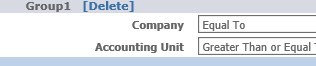
- Structure Name (ACOUNTING UNIT in our example)
- Structure Sub-name (ACCOUNTING UNIT under Group1 in our example)
- Condition (equal to, greater than etc.)
- Assigned value to structure
- Used to create a 2nd column after column G
- Represents element group (multiple would create sub groups within same structure)
- Represents multiple element fields within a structure group (see below example)

- Owner – typically Lawson or another admin user
- Start Date (how far back could the user access older reports)
- End Date (how far in the future could user access new reports)
- Now once you create your load file, go into LBI Reporting Services Administration and go to Import Rights
- Browse and select your CSV template file
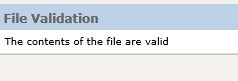
- Click Validate Only to see any returned errors

- If contents are valid, add file again and this time click the Validate and Load button

Go to maintain rights and validate your user was loaded with proper data. Good luck!
Many organizations opt to engage Lawson consultant teams for managing their Lawson Business Intelligence (LBI) system. These consultant teams offer managed services at a fixed monthly rate and possess extensive knowledge and expertise in managing LBI. This service is particularly suitable for larger organizations, but smaller organizations that do not require a full-time Lawson employee on-site may also find it beneficial. Nogalis provides this service, and you can contact us via our contact page for further information.
Retiring Lawson, PeopleSoft, or Oracle? APIX archives the entire application — every table, every year, attachments and security included — into your own AWS account in about 30 days, so you can decommission the legacy system and keep full access to the history.

