
How to resolve error: actor_does_not_support_run_as
After an install or an update, you may experience an error “actor_does_not_support_run_as” on certain node types.
Caused by: com.lawson.security.authen.SecurityAuthenException: com.lawson.security.authen.LawsonUserContextImpl.security.authen.actor_does_not_support_run_as
at com.lawson.security.authen.LawsonUserContextImpl.setRunAsUserOnContext(LawsonUserContextImpl.java:1498)
at com.lawson.security.authen.LawsonUserContextImpl.setRunAsUserOnContext(LawsonUserContextImpl.java:1461)
at com.lawson.security.authen.LawsonUserContextImpl.setRunAsUserOnContext(LawsonUserContextImpl.java:1452)
at com.lawson.security.authen.LawsonUserContextImpl.setRunAsUserOnDuplicateContext(LawsonUserContextImpl.java:1593)
at com.lawson.security.authen.DataCtxUserCtxWrapper.setRunAsUserOnDuplicateContext(DataCtxUserCtxWrapper .java:432)
… 15 more
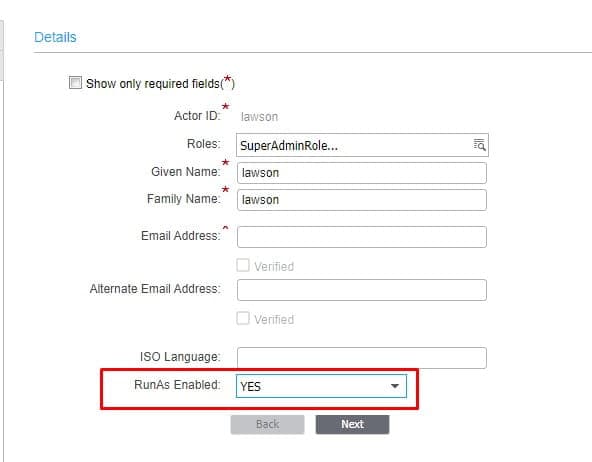
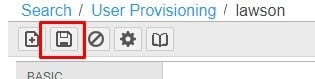
To mitigate this issue, log into ISS, and go to Manage Users. Search for the lawson user and click the Edit button. On the Basic tab, set “RunAs Enabled” to “YES” and click save. Wait for the configuration to take effect, or run a stoplaw/adminlaw/startlaw.

If you are not using ISS, the Landmark command to set the RunAs is:
secadm actor enablerunas lawson
After running this command, run the stoplaw/adminlaw/startlaw.
Retiring Lawson, PeopleSoft, or Oracle? APIX archives the entire application — every table, every year, attachments and security included — into your own AWS account in about 30 days, so you can decommission the legacy system and keep full access to the history.

