
AS400 Disk space usage
In AS400, it is convenient to know where all your data is distributed as well as how much disk space you have consumed and have leftover to use. If you want easy access to all this information at hand, all you need to do is run a simple command.
To get your AS400 Disk space usage, use the following command in your green screen command line:
Dspsyssts
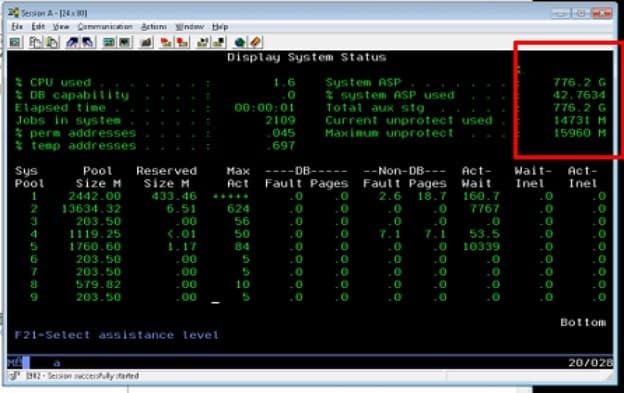
On the right-hand top corner, you will see the sizes listed. You can run this command as often as you need to keep track of your disk space usage on a daily (or periodic) basis.
Retiring Lawson, PeopleSoft, or Oracle? APIX archives the entire application — every table, every year, attachments and security included — into your own AWS account in about 30 days, so you can decommission the legacy system and keep full access to the history.

