
844-NOGALIS (844-664-2547)
Nogalis, Inc.
  • Link to Facebook
  • Link to X
  • Link to LinkedIn
  • Link to Mail
  • Company
    • News, Events and Articles
    • About Us
  • Products
    • Infor Lawson Data Archive
    • PeopleSoft Data Archive
    • Oracle Data Archive
  • Services
    • Infor Lawson Support
    • Infor Lawson / CloudSuite Consulting
  • Education & Training
  • Support
  • Contact Us
  • Click to open the search input field Click to open the search input field Search
  • Menu Menu

Run a network trace on a Lawson issue WITHOUT fiddler

Articles, Frontpage Article, News

Lawson issue not showing in the logs? This is how you would run a network trace WITHOUT fiddler.


Using Google Chrome.

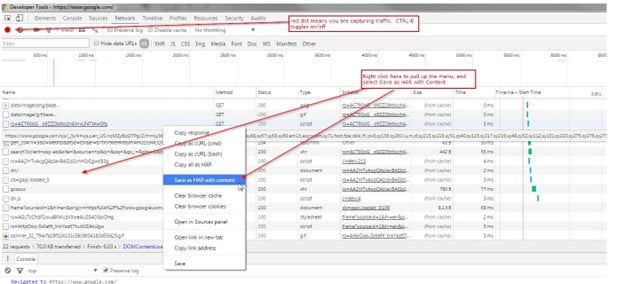
  1. Open Chrome, open a new tab and press CTRL-SHIFT-I.
  2. On the Network tab, ensure the circle in top-left corner is red. CTRL-E toggles tracing on/off.
  3. Duplicate the issue.
  4. Right-click on any of the http sessions, and select “Save as HAR with content”.
  5. Save the file to your desktop, and upload the file to the support incident.
  6. Send file to your Lawson support consultant.

Chrome Example screenshot below:
Using Microsoft Edge Chromium

  1. Open Edge and Press “F12” to open IE Developer Tools.
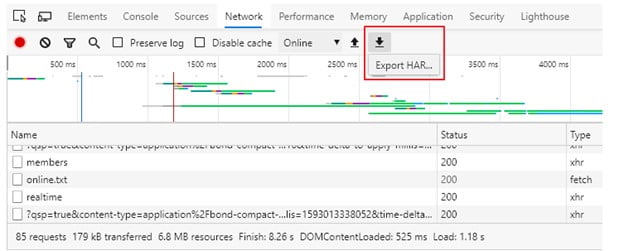
  2. On the Network tab, ensure there is a red circle in the top-left corner. If you see the green “play” button, click it to start recording.
  3. Duplicate the Issue.
  4. Click on the “Export HAR” icon to save traffic to a .har file.
  5. Send file to your Lawson support consultant.


Edge Example Screenshot:
This is sometimes daunting for users to perform on their own so a trained Lawson professional is ideal to assist via a remote meeting like Zoom or Teams.

Organizations often have trouble staffing Lawson professionals (or they’re spread thin) and alternatively go with teams of Lawson consultants who offer managed services at a fixed rate. This can help larger organizations who have daily user issues and need a team of trained Lawson professionals to assist.

Retiring Lawson, PeopleSoft, or Oracle? APIX archives the entire application — every table, every year, attachments and security included — into your own AWS account in about 30 days, so you can decommission the legacy system and keep full access to the history.

See how the APIX ERP archive works →

08/19/2022
Share this entry
  • Share on Facebook
  • Share on X
  • Share on WhatsApp
  • Share on LinkedIn
  • Share on Reddit
  • Share by Mail
https://www.nogalis.com/wp-content/uploads/2022/08/Run-a-network-trace-on-a-Lawson-issue-WITHOUT-fiddler.jpg 470 470 Angeli Menta https://www.nogalis.com/wp-content/uploads/2013/04/logo-with-slogan-good.png Angeli Menta2022-08-19 08:37:242022-08-11 14:44:24Run a network trace on a Lawson issue WITHOUT fiddler

LEGACY ERP DATA ARCHIVE SOLUTION


Discover how our clients are leveraging AWS services to archive their Legacy ERP data and provide ubiquitous access to users via a light-weight, secure, and read-only web interface. Secure, Fast, Reliable, and Cost Effective. That is the promise of APIX. Follow the link below to find out more and book a discovery call with our data archive specialist.

BOOK DEMO

© Copyright - Nogalis, Inc. 2026
  • Legal
  • Privacy
  • Contact Us
Link to: Amazon launches AWS Private 5G Link to: Amazon launches AWS Private 5G Amazon launches AWS Private 5G Link to: Weekly Patch Notification: August 20, 2022 Link to: Weekly Patch Notification: August 20, 2022 Weekly Patch Notification: August 20, 2022
Scroll to top Scroll to top Scroll to top