
844-NOGALIS (844-664-2547)
Nogalis, Inc.
  • Link to Facebook
  • Link to X
  • Link to LinkedIn
  • Link to Mail
  • Company
    • News, Events and Articles
    • About Us
  • Products
    • Infor Lawson Data Archive
    • PeopleSoft Data Archive
    • Oracle Data Archive
  • Services
    • Infor Lawson Support
    • Infor Lawson / CloudSuite Consulting
  • Education & Training
  • Support
  • Contact Us
  • Click to open the search input field Click to open the search input field Search
  • Menu Menu

505 – Internal server error when accessing Lawson Inbasket

Articles, Frontpage Article, News

This problem can occur after updating Lawson and Landmark from an older version and or when organizations update previous users to a newer naming convention.


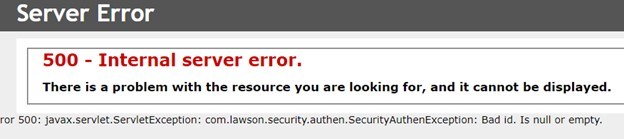
Problem: A user is trying to access their Inbasket to approve orders but receive the error below:
 

  1. Validate the user is setup correctly in Lawson Security
  2. Validate the user is setup correctly in Landmark via Rich Client or Process Server Admin
  3. The RMID in Lawson Security must match the Landmark Actor ID.
  4. If Step 3 does not resolve the error, look into the IOS.log and see how the users RMID is appearing there and make sure the Actor ID matches the casing there.

This can be a tricky issue to resolve, especially for organizations with a single Lawson professional to debug while they are swarmed in daily tickets and also tasked with maintaining recurring process flows.

Alternatively, organizations will hire a Lawson consultant team that have a wider range of expertise who offer managed services at a fixed monthly rate. This would be more ideal for larger organizations with many daily tickets or workflows to maintain or even smaller ones who don’t need a single dedicated Lawson professional but still need weekly maintenance/support.


Retiring Lawson, PeopleSoft, or Oracle? APIX archives the entire application — every table, every year, attachments and security included — into your own AWS account in about 30 days, so you can decommission the legacy system and keep full access to the history.

See how the APIX ERP archive works →

05/27/2022
Share this entry
  • Share on Facebook
  • Share on X
  • Share on WhatsApp
  • Share on LinkedIn
  • Share on Reddit
  • Share by Mail
https://www.nogalis.com/wp-content/uploads/2022/05/505-–-Internal-server-error-when-accessing-Lawson-Inbasket.jpg 470 470 Angeli Menta https://www.nogalis.com/wp-content/uploads/2013/04/logo-with-slogan-good.png Angeli Menta2022-05-27 08:08:212022-05-21 21:10:54505 – Internal server error when accessing Lawson Inbasket

LEGACY ERP DATA ARCHIVE SOLUTION


Discover how our clients are leveraging AWS services to archive their Legacy ERP data and provide ubiquitous access to users via a light-weight, secure, and read-only web interface. Secure, Fast, Reliable, and Cost Effective. That is the promise of APIX. Follow the link below to find out more and book a discovery call with our data archive specialist.

BOOK DEMO

© Copyright - Nogalis, Inc. 2026
  • Legal
  • Privacy
  • Contact Us
Link to: Is It Time to Replace Your Legacy ERP System? Link to: Is It Time to Replace Your Legacy ERP System? Is It Time to Replace Your Legacy ERP System? Link to: Weekly Patch Notification: May 28, 2022 Link to: Weekly Patch Notification: May 28, 2022 Weekly Patch Notification: May 28, 2022
Scroll to top Scroll to top Scroll to top