
Socket Error in ISA
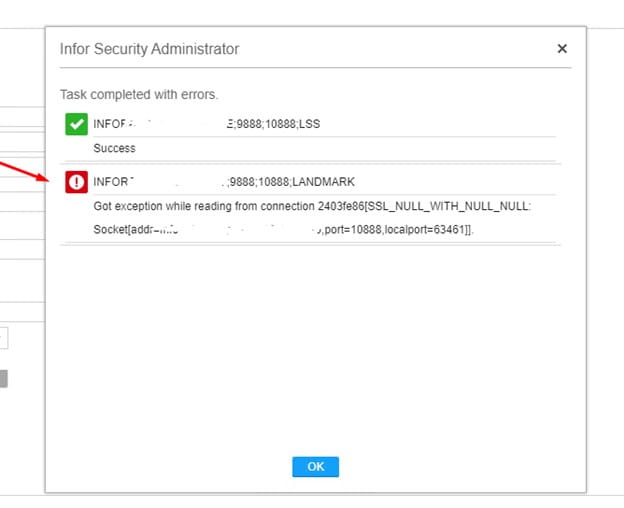
If you receive a “socket” error when saving data in Infor Security Administrator, it is probable that your Federated Server Certificate is corrupt or out of sync and needs to be recreated. Note that this is NOT the WS Federation Certificate.
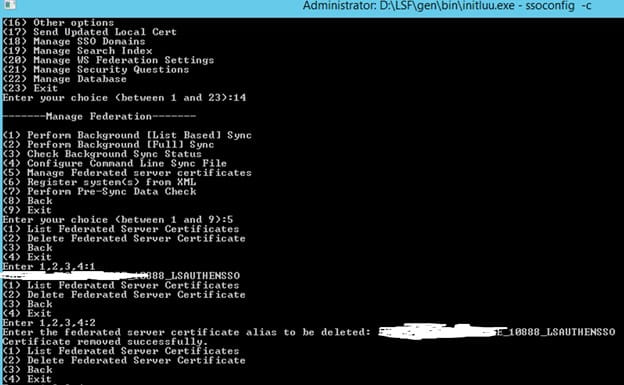
To recreate the Federated Server Certificate, open a command line window on the LSF server and set the environment variables. Log into ssoconfig -c.
First, get the Federated Server Certificate name. “Manage Federation” > “Manage Federated Server Certificates” > “List Federated Server Certificates”. Make note of the name.
Select “Manage Federation” > “Manage Federated Server Certificates” > “Delete Federated Server Certificate”. Type in the name that you saved above.
After a successful confirmation, restart the servers and try again. A new Federated Server Certificate will be generated upon recycle.
Retiring Lawson, PeopleSoft, or Oracle? APIX archives the entire application — every table, every year, attachments and security included — into your own AWS account in about 30 days, so you can decommission the legacy system and keep full access to the history.

