844-NOGALIS (844-664-2547)
Nogalis, Inc.
  • Link to Facebook
  • Link to X
  • Link to LinkedIn
  • Link to Mail
  • Company
    • News, Events and Articles
    • About Us
  • Products
    • Infor Lawson Data Archive
    • PeopleSoft Data Archive
    • Oracle Data Archive
  • Services
    • Infor Lawson Support
    • Infor Lawson / CloudSuite Consulting
  • Education & Training
  • Support
  • Contact Us
  • Click to open the search input field Click to open the search input field Search
  • Menu Menu

Resolving LBI Error: There are not any Rights on File for the requested User

Articles, Frontpage Article

Lawson Business Intelligence has this common issue where users load up a report and get an error that they don’t have the proper rights to access a report setup with bursting. At first glance it appears they are all setup but are they?


Resolution:

  1. Login into LBI (must have admin rights) >> Tools >> Report Administration
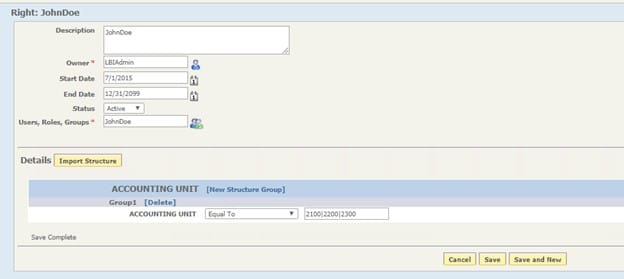
  2. Go to Maintain Rights and filter down on the user that is having this issue:
  3. At this point it appears the user is setup correctly but there are two checks that need to be done.
    • Verify the report the user is accessing (assuming it’s a historical instance) was generated after the Start Date field, else change the Start Date to an earlier date to resolve.
    • Click on the blue green people icon to make sure the user’s bursting rights weren’t setup before the user synchronized into LBI from LSF.
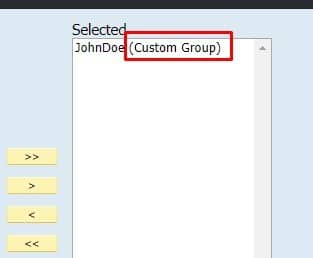
  4. If you see the user is categorized as a (Custom Group), delete the users current rights.

Delete:

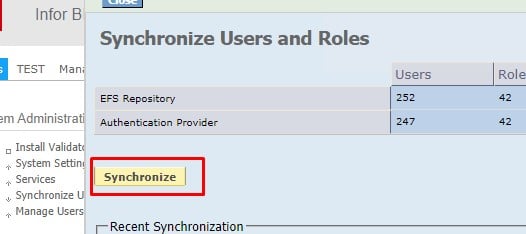
  1. LBI dashboard >> Tools >> Synchronize Users and Roles >> Click Synchronize
  2. Go back and create the users rights and verify the (Custom Group) is no longer displayed near their name.
Hope this was helpful, good luck!

Retiring Lawson, PeopleSoft, or Oracle? APIX archives the entire application — every table, every year, attachments and security included — into your own AWS account in about 30 days, so you can decommission the legacy system and keep full access to the history.

See how the APIX ERP archive works →

11/29/2021
Share this entry
  • Share on Facebook
  • Share on X
  • Share on WhatsApp
  • Share on LinkedIn
  • Share on Reddit
  • Share by Mail
https://www.nogalis.com/wp-content/uploads/2021/11/Resolving-LBI-Error-There-are-not-any-Rights-on-File-for-the-requested-User.jpg 470 470 Angeli Menta https://www.nogalis.com/wp-content/uploads/2013/04/logo-with-slogan-good.png Angeli Menta2021-11-29 08:34:002021-11-24 18:43:31Resolving LBI Error: There are not any Rights on File for the requested User

LEGACY ERP DATA ARCHIVE SOLUTION


Discover how our clients are leveraging AWS services to archive their Legacy ERP data and provide ubiquitous access to users via a light-weight, secure, and read-only web interface. Secure, Fast, Reliable, and Cost Effective. That is the promise of APIX. Follow the link below to find out more and book a discovery call with our data archive specialist.

BOOK DEMO

© Copyright - Nogalis, Inc. 2026
  • Legal
  • Privacy
  • Contact Us
Link to: Weekly Patch Notification: November 27, 2021 Link to: Weekly Patch Notification: November 27, 2021 Weekly Patch Notification: November 27, 2021 Link to: Infor Coleman AI Digital Assistant App Now Available for Microsoft Teams Link to: Infor Coleman AI Digital Assistant App Now Available for Microsoft Teams Infor Coleman AI Digital Assistant App Now Available for Microsoft Teams
Scroll to top Scroll to top Scroll to top