844-NOGALIS (844-664-2547)
Nogalis, Inc.
  • Link to Facebook
  • Link to X
  • Link to LinkedIn
  • Link to Mail
  • Company
    • News, Events and Articles
    • About Us
  • Products
    • Infor Lawson Data Archive
    • PeopleSoft Data Archive
    • Oracle Data Archive
  • Services
    • Infor Lawson Support
    • Infor Lawson / CloudSuite Consulting
  • Education & Training
  • Support
  • Contact Us
  • Click to open the search input field Click to open the search input field Search
  • Menu Menu

Lawson PA100 Job Goes into Recovery due to On-Prem BSI License Expiring

Articles, Frontpage Article, News

Problem – PA100 Job goes into recovery with similar error:

 “Error connecting to Taxfactory11 – THE PROVISIONAL LICENSE IS NOW EXPIRED.”


  1. To resolve this issue, login to your MyBSI account at https://mybsiconnect.force.com/login
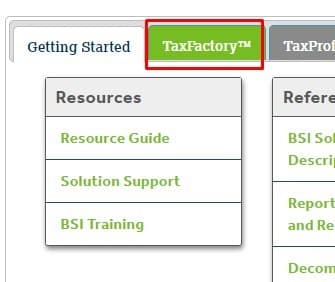
  2. Go to your TaxFactory Tab on the Home Page
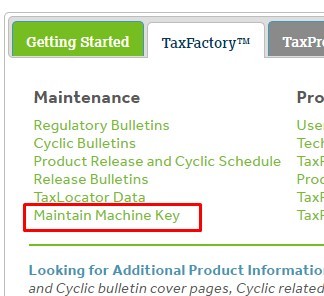
  3. Select Maintain Machine Key

  4. Click Add New Key >> Select Desired Version and enter Host Name where BSI is being hosted.
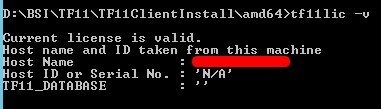
    1. Note: To verify current Host Name of license, open command prompt, change dir to where tf11lic.exe is located and type following command tf11lic -v

  5. One you enter the New Key Info, select the Request Server Key button
  6. You should now see your newly added Machine Key, click Save as File to download
  7. Copy the machinekey.lic file to the server where TF11 is installed and the tf11lic.exe is located
  8. In command prompt, cd to where tf11lic.exe is and type this command: tf11lic -i machinekey.lic

  9. Type tf11lic -v to validate if the license is valid.
  10. In Lawson portal, calculate a PR80 record to verify Lawson is connecting to BSI
  11. Connect to Lawson Interface Desktop >> jobschd >> recover PA100 job in recovery (or any other job that requires a valid BSI license that went into recovery)
 

That’s it! Good luck!

Retiring Lawson, PeopleSoft, or Oracle? APIX archives the entire application — every table, every year, attachments and security included — into your own AWS account in about 30 days, so you can decommission the legacy system and keep full access to the history.

See how the APIX ERP archive works →

11/23/2021
Share this entry
  • Share on Facebook
  • Share on X
  • Share on WhatsApp
  • Share on LinkedIn
  • Share on Reddit
  • Share by Mail
https://www.nogalis.com/wp-content/uploads/2021/11/Lawson-PA100-Job-Goes-into-Recovery-due-to-On-Prem-BSI-License-Expiring.jpg 470 470 Angeli Menta https://www.nogalis.com/wp-content/uploads/2013/04/logo-with-slogan-good.png Angeli Menta2021-11-23 08:04:522021-11-19 15:50:45Lawson PA100 Job Goes into Recovery due to On-Prem BSI License Expiring

LEGACY ERP DATA ARCHIVE SOLUTION


Discover how our clients are leveraging AWS services to archive their Legacy ERP data and provide ubiquitous access to users via a light-weight, secure, and read-only web interface. Secure, Fast, Reliable, and Cost Effective. That is the promise of APIX. Follow the link below to find out more and book a discovery call with our data archive specialist.

BOOK DEMO

© Copyright - Nogalis, Inc. 2026
  • Legal
  • Privacy
  • Contact Us
Link to: French Wine Maker Chooses Infor to Ferment New Business Process Management Link to: French Wine Maker Chooses Infor to Ferment New Business Process Management French Wine Maker Chooses Infor to Ferment New Business Process Management Link to: 10 Most Important Benefits of CRM Software Link to: 10 Most Important Benefits of CRM Software 10 Most Important Benefits of CRM Software
Scroll to top Scroll to top Scroll to top