
Landmark 11 – Update Java
If you perform a Java update on your Landmark server, and your JAVA_HOME location is moving, you will need to update the java location in several places in Landmark.
InforIONGrid
For the Grid, first open an administrator command window and navigate to GRID_HOME/grids/<grid name> and run the “ChangeJDK.cmd” command with the NEW location of Java:

Next, open the Grid Management Pages. Go to Configuration > Grid Configuration > Grid Properties. Select Property “Java Executable (Path)”. Set the Java path to the new location under your grid host.
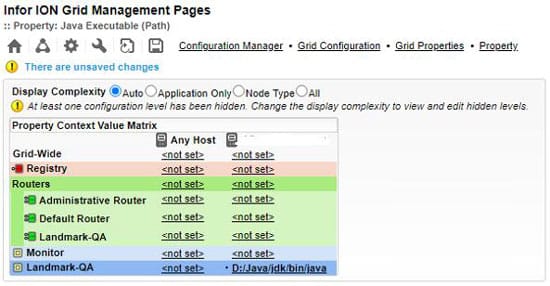
Landmark
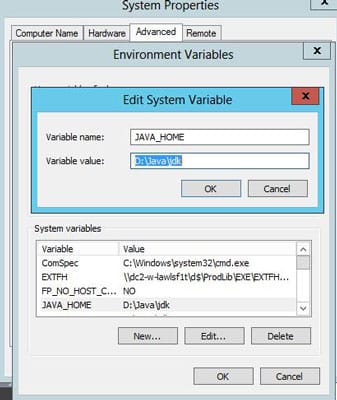
For Landmark, set the JAVA_HOME and LAW_JAVA_HOME environment variables to the new location. It is also a good idea to update LAW_JAVA_HOME in the LASYSDIR/install.cfg file for future patches.

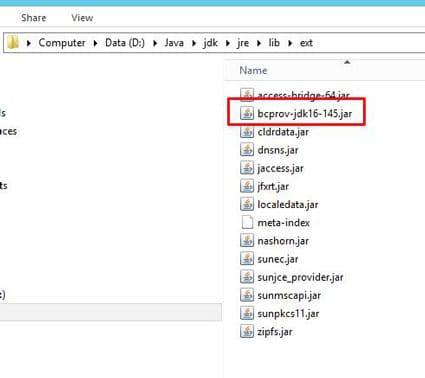
Finally, open an administrator command window and set the Landmark environment variables. Navigate to the NEW java location. Run the command java -jar %LAENVDIR%/java/jar/bcinstall.jar. Verify that this command adds the bouncycastle provider to the java.security file located at JAVA_HOME/jre/lib/security. Also, verify that the command copies the “bcprov” jar to JAVA_HOME/jdk/jre/lib/ext. If either of these tasks is not completed, you can handle them manually.

Run a stoplaw/startlaw and restart the grid. Or, better yet, reboot the server.
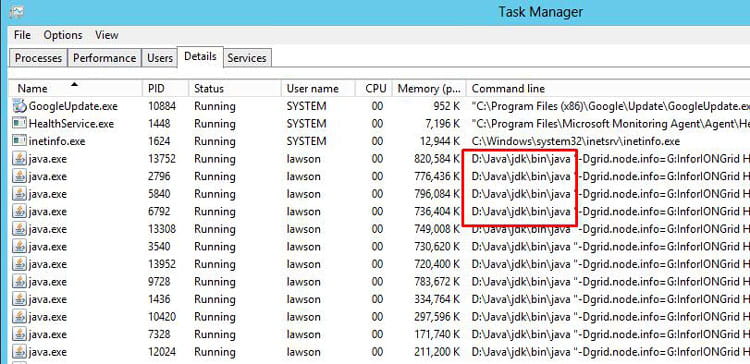
To verify that the new java location is being used by all the application systems, open task manager, and add the “Command line” header under the details screen. Verify that all “java.exe” processes are running from the correct location. You are now safe to uninstall your old java instance.
Retiring Lawson, PeopleSoft, or Oracle? APIX archives the entire application — every table, every year, attachments and security included — into your own AWS account in about 30 days, so you can decommission the legacy system and keep full access to the history.

