844-NOGALIS (844-664-2547)
Nogalis, Inc.
  • Link to Facebook
  • Link to X
  • Link to LinkedIn
  • Link to Mail
  • Company
    • News, Events and Articles
    • About Us
  • Products
    • Infor Lawson Data Archive
    • PeopleSoft Data Archive
    • Oracle Data Archive
  • Services
    • Infor Lawson Support
    • Infor Lawson / CloudSuite Consulting
  • Education & Training
  • Support
  • Contact Us
  • Click to open the search input field Click to open the search input field Search
  • Menu Menu

GL199 Error Company Being Processed in Different Job

Articles, Frontpage Article, News

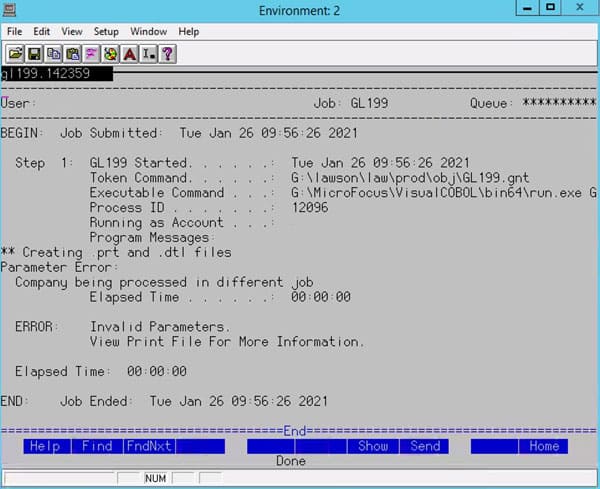
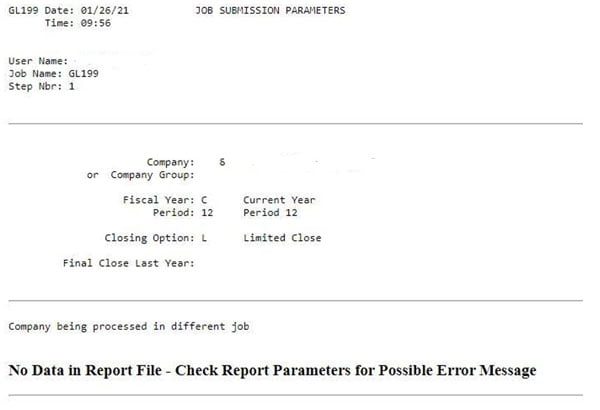
If you are running GL199 to close the period, you may encounter the below error message in the print file (or in the job scheduler log) “Company being processed in different job”.

This means that Lawson “thinks” there is another GL199 job running that is processing the same company your job is trying to process.  If that is the case, allow the first job to finish before running yours.  However, there may not be any other jobs running, yet you are still encountering the error.

To troubleshoot, first try to trace back to the first time the GL199 ran and failed (it may be in recovery or canceled).  Look at the examine log for that run.  There may be a different error that indicates the root cause of the issue.  If so, resolve that issue and recover or rerun that job.

If there are no issues to resolve, and you are certain that the GL199 hasn’t failed in the middle of updating records, you can get your DBA to update the status flag so that Lawson will no longer think the GL199 is running.  This can be accomplished by creating a paint screen for GLSYSTEM, or by making a direct update in the database.  The field “UPDATING” needs to be set to 0.  Additionally, you should check to see if your failed GL199 job is stuck in GLMONITOR.  If so, you should delete the record for that job.  But make sure you are deleting the record for your job!!!
Retiring Lawson, PeopleSoft, or Oracle? APIX archives the entire application — every table, every year, attachments and security included — into your own AWS account in about 30 days, so you can decommission the legacy system and keep full access to the history.

See how the APIX ERP archive works →

04/20/2021
Share this entry
  • Share on Facebook
  • Share on X
  • Share on WhatsApp
  • Share on LinkedIn
  • Share on Reddit
  • Share by Mail
https://www.nogalis.com/wp-content/uploads/2021/04/GL199-Error-Company-Being-Processed-in-Different-Job.jpg 470 470 Angeli Menta https://www.nogalis.com/wp-content/uploads/2013/04/logo-with-slogan-good.png Angeli Menta2021-04-20 07:17:582021-04-15 16:49:10GL199 Error Company Being Processed in Different Job

LEGACY ERP DATA ARCHIVE SOLUTION


Discover how our clients are leveraging AWS services to archive their Legacy ERP data and provide ubiquitous access to users via a light-weight, secure, and read-only web interface. Secure, Fast, Reliable, and Cost Effective. That is the promise of APIX. Follow the link below to find out more and book a discovery call with our data archive specialist.

BOOK DEMO

© Copyright - Nogalis, Inc. 2026
  • Legal
  • Privacy
  • Contact Us
Link to: Aquitaine Hospitality Deepens Partnership with Infor Link to: Aquitaine Hospitality Deepens Partnership with Infor Aquitaine Hospitality Deepens Partnership with Infor Link to: 5 Benefits of Using a CRM for Your Business Link to: 5 Benefits of Using a CRM for Your Business 5 Benefits of Using a CRM for Your Business
Scroll to top Scroll to top Scroll to top