844-NOGALIS (844-664-2547)
Nogalis, Inc.
  • Link to Facebook
  • Link to X
  • Link to LinkedIn
  • Link to Mail
  • Company
    • News, Events and Articles
    • About Us
  • Products
    • Infor Lawson Data Archive
    • PeopleSoft Data Archive
    • Oracle Data Archive
  • Services
    • Infor Lawson Support
    • Infor Lawson / CloudSuite Consulting
  • Education & Training
  • Support
  • Contact Us
  • Click to open the search input field Click to open the search input field Search
  • Menu Menu

MSCM Handheld Test Fails with Secured URL

Articles, Frontpage Article, News

If you are testing your MSCM handheld connection against the secured MSCM URL, and getting a “Test Failed” error, you may need to modify the Quality of Protection protocol in WebSphere.

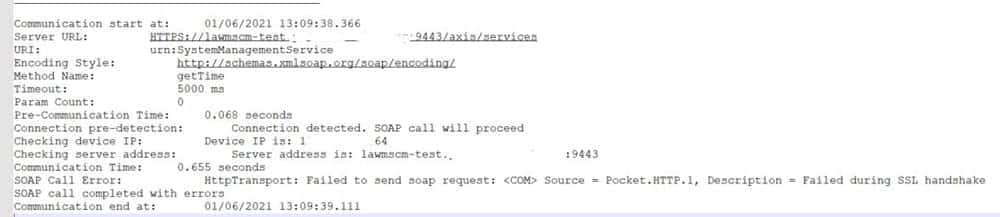
The symptoms of the issue are: “Test Failed” message on the handheld, and the MSCM COMM log will show an error stating “Failed during SSL handshake”.
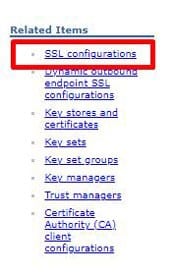
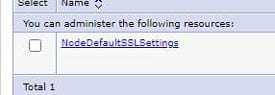
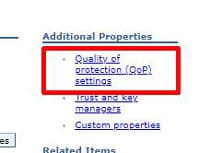
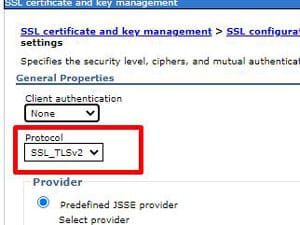
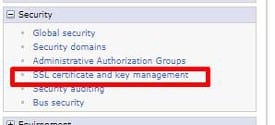
To update the QoP protocol in WebSphere, open the WebSphere Admin Console for MSCM, and navigate to Security > SSL certificate and key management.  Click “SSL configurations” on the right side of the page.  Then select the NodeDefaultSSLSettings.  Click “Quality of protection (QoP) settings” on the right.  Update the Protocol to “SSL_TLSv2”.  Click “Apply” and save the configuration.  Repeat these steps for the cell (if applicable), then restart WebSphere services for MSCM.


**NOTE: To avoid future issues with the MSCM/Lawson connection, it is best to set the QoP protocol in the LSF WebSphere Console to the same values as MSCM.  Do this both for the Node and the Cell.


Retiring Lawson, PeopleSoft, or Oracle? APIX archives the entire application — every table, every year, attachments and security included — into your own AWS account in about 30 days, so you can decommission the legacy system and keep full access to the history.

See how the APIX ERP archive works →

04/09/2021
Share this entry
  • Share on Facebook
  • Share on X
  • Share on WhatsApp
  • Share on LinkedIn
  • Share on Reddit
  • Share by Mail
https://www.nogalis.com/wp-content/uploads/2021/04/MSCM-Handheld-Test-Fails-with-Secured-URL.jpg 470 470 Angeli Menta https://www.nogalis.com/wp-content/uploads/2013/04/logo-with-slogan-good.png Angeli Menta2021-04-09 07:03:592021-04-06 15:24:48MSCM Handheld Test Fails with Secured URL

LEGACY ERP DATA ARCHIVE SOLUTION


Discover how our clients are leveraging AWS services to archive their Legacy ERP data and provide ubiquitous access to users via a light-weight, secure, and read-only web interface. Secure, Fast, Reliable, and Cost Effective. That is the promise of APIX. Follow the link below to find out more and book a discovery call with our data archive specialist.

BOOK DEMO

© Copyright - Nogalis, Inc. 2026
  • Legal
  • Privacy
  • Contact Us
Link to: Can ERP implementation happen remotely? Link to: Can ERP implementation happen remotely? Can ERP implementation happen remotely? Link to: Weekly Patch Notification: April 10, 2021 Link to: Weekly Patch Notification: April 10, 2021 Weekly Patch Notification: April 10, 2021
Scroll to top Scroll to top Scroll to top