

How to enable IOS DEBUG Logging in Lawson System Foundation
IOS debug logging can be useful for tracking down issues in Lawson Portal, Add-ins, and Ming.le. There are two methods to enable it, we prefer method 1 below.
Method 1 (ios_logging.properties file must be renamed or deleted for this method to work):
- Login to your LSF on-prem server (Admin access required)
- Make a backup copy of your xml in %LAWDIR%\system
- Edit the xml file with a text editor.
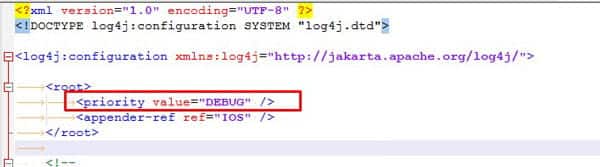
- Change INFO to DEBUG as shown below
- Ideally only use DEBUG if temporarily debugging an issue else leave it on INFO)

- Ideally only use DEBUG if temporarily debugging an issue else leave it on INFO)
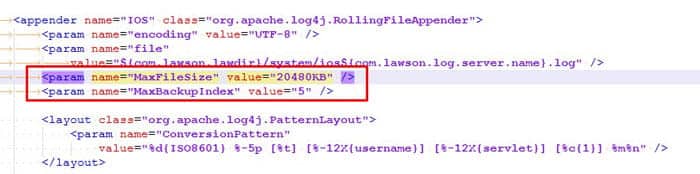
- If using DEBUG (or prefer a longer history of logging), you also may want to increase the log file size MaxFileSize and maximum number of logs to be generated MaxBackupIndex
Below our IOS logs will be 20mb and we will have a max backup of 5.
You should now see DEBUG entries in the log.
Method 2 – ios_logging.properties (this will be used by default over ios_logging.xml if it exists)
- As the lawson user, make a backup copy of ios_logging.properties in %LAWDIR%\system (if it exists).
- Copy the ios_logging.properties file from %GENDIR%\install to %LAWDIR%\system (you will only need to do this once to update the formatting of the ios_logging.properties file with the latest delivered version from %GENDIR%\install).
- Edit the ios_logging.properties file in %LAWDIR%\system:
- Change the second line in the file from INFO to DEBUG.
##Set root logger level to DEBUG and its only appender to A1.
log4j.rootLogger=INFO, IOS
to:
log4j.rootLogger=DEBUG, IOS
- Change these lines:
log4j.appender.IOS.MaxFileSize=2048KB
log4j.appender.IOS.MaxBackupIndex=5
to:
log4j.appender.IOS.MaxFileSize=20480KB
log4j.appender.IOS.MaxBackupIndex=5
This increases your log from 2mb to 20mb with a max of 5 log files. Adjust based on how busy your system is.
NOTE: A restart of WebSphere is not needed for these changes unless you are switching between ios_logging.properties and ios_logging.xml.
You should now see DEBUG entries in the log.
Good luck and happy debugging!
Retiring Lawson, PeopleSoft, or Oracle? APIX archives the entire application — every table, every year, attachments and security included — into your own AWS account in about 30 days, so you can decommission the legacy system and keep full access to the history.

