

844-NOGALIS (844-664-2547)
Nogalis, Inc.
  • Link to Facebook
  • Link to X
  • Link to LinkedIn
  • Link to Mail
  • Company
    • News, Events and Articles
    • About Us
  • Products
    • Infor Lawson Data Archive
    • PeopleSoft Data Archive
    • Oracle Data Archive
  • Services
    • Infor Lawson Support
    • Infor Lawson / CloudSuite Consulting
  • Education & Training
  • Support
  • Contact Us
  • Click to open the search input field Click to open the search input field Search
  • Menu Menu

How to Change Lawson Portal TEST Banner

Articles, Frontpage Article, News

When having users test new patches, it’s a good practice to distinguish TEST from PROD visually. This helps users know what environment they’re in as they may be testing after a long day and may think they are testing in TEST when in fact they are changing production data.


This can simply be done by changing a banner color in Lawson Portal.

  1. Login to your TEST environment and locate your index.htm file found here: “D:\<lsf_folder>\web\lawson\portal”
  2. Assuming your index.htm file is unmodified locate header id=“topBanner”

  3. Use an online HTML Color Picker tool to choose the hex color you want to appear and replace background-color:#ff8787 to your preferred color hex color code.

Example of how it will appear:
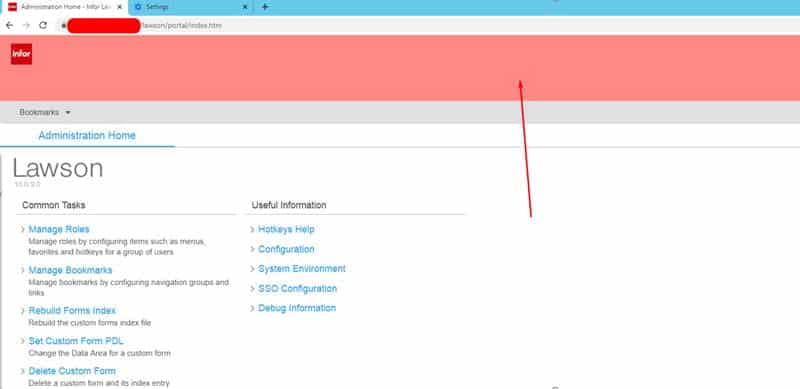
  1. Save the changes, clear IOS cache, clear your browser cache, logout and back in to see the change. Enjoy!

Retiring Lawson, PeopleSoft, or Oracle? APIX archives the entire application — every table, every year, attachments and security included — into your own AWS account in about 30 days, so you can decommission the legacy system and keep full access to the history.

See how the APIX ERP archive works →

03/10/2021
Share this entry
  • Share on Facebook
  • Share on X
  • Share on WhatsApp
  • Share on LinkedIn
  • Share on Reddit
  • Share by Mail
https://www.nogalis.com/wp-content/uploads/2021/03/How-to-Change-Lawson-Portal-TEST-Banner.jpg 470 470 Angeli Menta https://www.nogalis.com/wp-content/uploads/2013/04/logo-with-slogan-good.png Angeli Menta2021-03-10 08:02:332021-03-04 12:59:09How to Change Lawson Portal TEST Banner

LEGACY ERP DATA ARCHIVE SOLUTION


Discover how our clients are leveraging AWS services to archive their Legacy ERP data and provide ubiquitous access to users via a light-weight, secure, and read-only web interface. Secure, Fast, Reliable, and Cost Effective. That is the promise of APIX. Follow the link below to find out more and book a discovery call with our data archive specialist.

BOOK DEMO

© Copyright - Nogalis, Inc. 2026
  • Legal
  • Privacy
  • Contact Us
Link to: 4 Ways That Technology Has Improved Medical Care Link to: 4 Ways That Technology Has Improved Medical Care 4 Ways That Technology Has Improved Medical Care Link to: SanMar Digitizes its Financial Supply Chain with Infor to Drive Growth Link to: SanMar Digitizes its Financial Supply Chain with Infor to Drive Growth SanMar Digitizes its Financial Supply Chain with Infor to Drive Growth
Scroll to top Scroll to top Scroll to top