
844-NOGALIS (844-664-2547)
Nogalis, Inc.
  • Link to Facebook
  • Link to X
  • Link to LinkedIn
  • Link to Mail
  • Company
    • News, Events and Articles
    • About Us
  • Products
    • Infor Lawson Data Archive
    • PeopleSoft Data Archive
    • Oracle Data Archive
  • Services
    • Infor Lawson Support
    • Infor Lawson / CloudSuite Consulting
  • Education & Training
  • Support
  • Contact Us
  • Click to open the search input field Click to open the search input field Search
  • Menu Menu

LBI Auditing Part 2 – Setting up Admin Audit Reports

Articles, Frontpage Article, News

In LBI Auditing Part 1, we went over enabling dashboard auditing. This time we will go over how to set up special Admin Audit Reports to view more information about LBI activity via Framework/Reporting Services and Smart Notifications. These reports are for 10.6.0.0 and later but check with Infor if they are supported for older versions.


  1. Login to Infor Support Portal and go to the LBI Product Download page.
  2. Download the BI-Samples.zip file and unzip to a temporary location
  3. Locate Infor-LBI-Admin-Reports-SolutionPack.zip
  4. Login into LBI and go to Tools dashboard
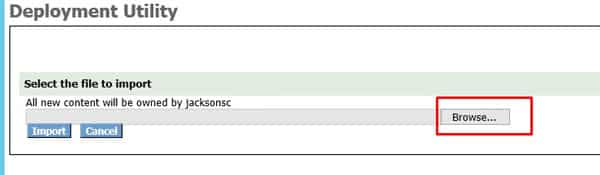
  5. Click the Deployment Utility link and a Deployment Utility window will pop-up
  6. Browse for the solution pack mentioned in Step 3, select it and then click Import
    • NOTE: Framework Services content is delivered in a folder called fs; Reporting Services in a folder called rs; Smart Notification in a folder called sn.
    • No tab will be displayed for a service if the solution package does not contain a solution for that service or if the service is not registered/installed.
  7. When the import is completed, a screen is displayed with a tab for each imported package, click on a tab to view the import and additional details.
  8. If the import fails for any reason, try and correct the issue, verify zip file is not corrupt, re-import.
    • NOTE: Remove any applications directories where the import was successful to avoid duplicate content.
 

Make sure to check out Part 3a – “Overview of Framework Service Admin Audit Reports”  (coming soon) to get more insight into these reports.

Retiring Lawson, PeopleSoft, or Oracle? APIX archives the entire application — every table, every year, attachments and security included — into your own AWS account in about 30 days, so you can decommission the legacy system and keep full access to the history.

See how the APIX ERP archive works →

02/23/2021
Share this entry
  • Share on Facebook
  • Share on X
  • Share on WhatsApp
  • Share on LinkedIn
  • Share on Reddit
  • Share by Mail
https://www.nogalis.com/wp-content/uploads/2021/02/LBI-Auditing-Part-2-Setting-up-Admin-Audit-Reports.jpg 470 470 Angeli Menta https://www.nogalis.com/wp-content/uploads/2013/04/logo-with-slogan-good.png Angeli Menta2021-02-23 07:54:462021-02-16 15:18:05LBI Auditing Part 2 – Setting up Admin Audit Reports

LEGACY ERP DATA ARCHIVE SOLUTION


Discover how our clients are leveraging AWS services to archive their Legacy ERP data and provide ubiquitous access to users via a light-weight, secure, and read-only web interface. Secure, Fast, Reliable, and Cost Effective. That is the promise of APIX. Follow the link below to find out more and book a discovery call with our data archive specialist.

BOOK DEMO

© Copyright - Nogalis, Inc. 2026
  • Legal
  • Privacy
  • Contact Us
Link to: Borders College Makes the Grade with Infor Link to: Borders College Makes the Grade with Infor Borders College Makes the Grade with Infor Link to: 6 benefits of having Enterprise Resource Planning in your pocket Link to: 6 benefits of having Enterprise Resource Planning in your pocket 6 benefits of having Enterprise Resource Planning in your pocket
Scroll to top Scroll to top Scroll to top