
Backing up the AD FS internal databases on Microsoft Server 2012
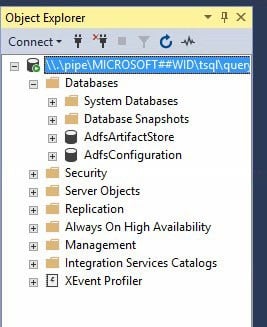
If AD FS is configured to use the Windows Internal Database (WID) server, there are a couple of ways to maintain the databases created in the install. They can be maintained using command-line sql or SQL Server Management Studio. The AD FS configuration databases are called AdfsArtifactStore and AdfsConfiguration.
Not that both of these methods need to be performed on the server where AD FS is configured.
Command-line SQL
Log into the AD FS server using the service account under which AD FS was configured.
To prepare the server to run SQLCMD.exe, you will need to install the Native Client, ODBC Driver 11 for SQL Server, and the Command Line Utilities for SQL Server 2012. These can be downloaded from Microsoft’s website.

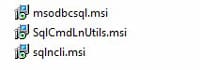
Once these utilities are installed, create two “.sql” files using a text editor, one for the artifact database and one for the configuration database. The following text should be placed in the sql file (update with the appropriate names and file paths). The database names are AdfsArtifactStore and AdfsConfiguration.
BACKUP DATABASE [database name] TO DISK = “backup-path/backup-file.BAK” WITH NOFORMAT, INIT, NAME = “Artifact – Full Database Backup”, SKIP, NOREWIND, NOUNLOAD,STATS = 10
GO

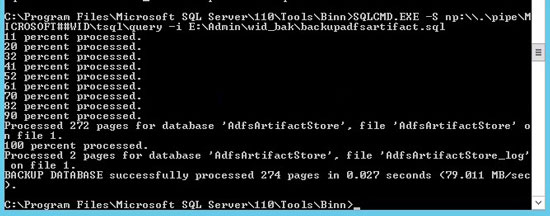
Next, run the sqlcmd to execute a SQL script (provide the name of the script you created in the step above).
sqlcmd.exe -S \\.\pipe\MICROSOFT##WID\tsql\query -i sql-script-path\sql-script-filename.sql
SQL Server Management Studio
The WID server can also be accessed using SQL Server Management Studio (SSMS). Note that SSMS must be installed on the server where AD FS is configured in order to be able to connect.
Log into the AD FS server using the service account under which AD FS was configured. Run SSMS as administrator. Connect to the server \\.\pipe\MICROSOFT##WID\tsql\query, and use Windows Authentication to connect.
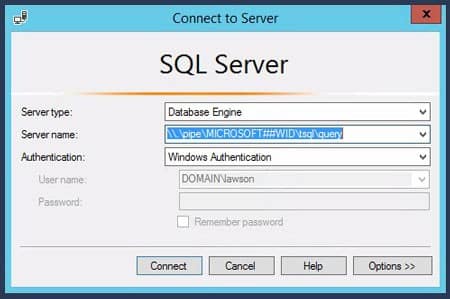
The AD FS configuration databases are AdfsArtifactStore and AdfsConfiguration. As long as you logged into SSMS as administrator, you should have admin rights on these databases to perform backups, run queries, etc.
Retiring Lawson, PeopleSoft, or Oracle? APIX archives the entire application — every table, every year, attachments and security included — into your own AWS account in about 30 days, so you can decommission the legacy system and keep full access to the history.

