
How to verify Lawson user AD identity through Windows powershell
A user in Lawson is unable to login to their account. Username or password is incorrect. Assuming your organization is using single sign-on through Active Directory, you can verify the user’s username via Windows powershell.
- Login into Lawson Security Administrator (or SCWeb Admin App). Locate the user and copy the username.
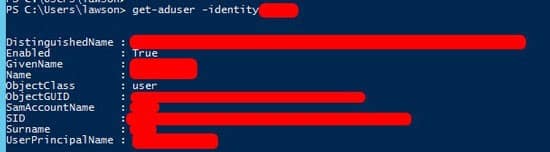
- Open powershell and check the user via this command: Get-ADuser -identity <username>
- If you receive this error: “Cannot find an object with identity”, the user is not setup in AD under that username.

- Check with the organizations IT team to verify the correct AD user (assuming you don’t have direct access).
- Once they send you that ID, check via powershell again and it should return this result:


Retiring Lawson, PeopleSoft, or Oracle? APIX archives the entire application — every table, every year, attachments and security included — into your own AWS account in about 30 days, so you can decommission the legacy system and keep full access to the history.

