
DSP for Ming.le Fails on Installation
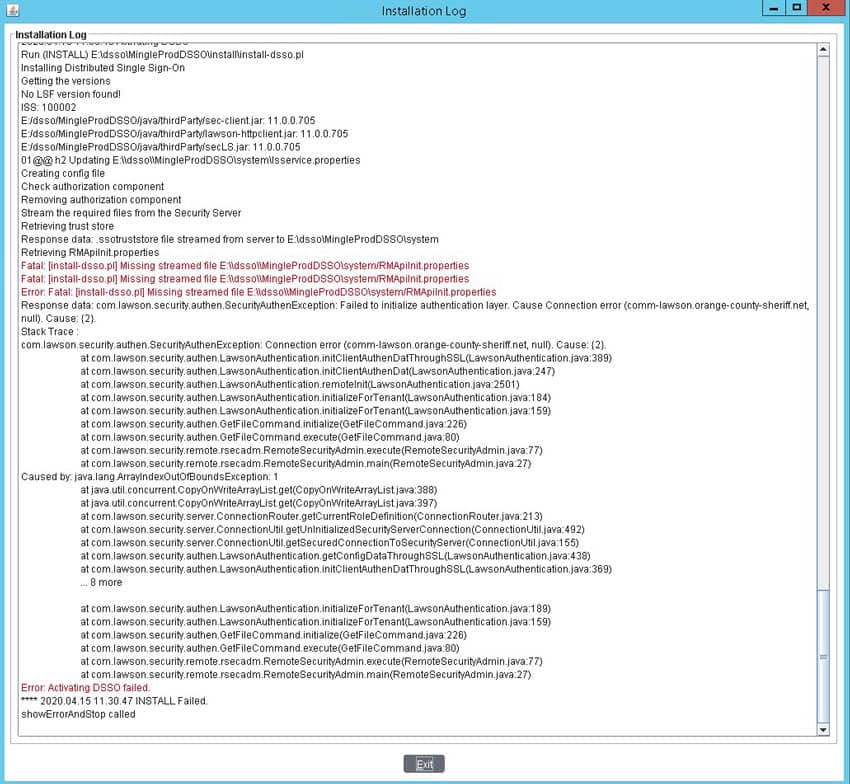
There is a common issue that may present itself when installing Distributed Security Package (DSP) for Ming.le. The install will fail when trying to retrieve the trust store from the LSF server, with a message similar to the screenshot below. There will also be exceptions in the LASE logs on the LSF server indicating a certificate issue (“Received fatal alert: certificate_unknown”).
Except from LASE log:
20-04-15 19:58:11:874 12 default.SEVERE authen.SSOServer.run(): SSOServer: Got unexpected exception when processing new secured connection com.lawson.security.server.LawsonNetException: Got exception while writing to connection /172.18.8.58,40001
Stack Trace : com.lawson.security.server.LawsonNetException: Got exception while writing to connection /172.18.8.58,40001
at com.lawson.security.server.AbstractDefaultEventSource.write(AbstractDefaultEventSource.java:299)
at com.lawson.security.server.Connection.<init>(Connection.java:170)
at com.lawson.lawsec.authen.SecuredConnection.<init>(SecuredConnection.java:39)
at com.lawson.lawsec.authen.SSOServer.run(SSOServer.java:180)Caused by:
javax.net.ssl.SSLHandshakeException: Received fatal alert: certificate_unknown
at sun.security.ssl.Alerts.getSSLException(Alerts.java:192)
at sun.security.ssl.Alerts.getSSLException(Alerts.java:154)
at sun.security.ssl.SSLSocketImpl.recvAlert(SSLSocketImpl.java:2020)
at sun.security.ssl.SSLSocketImpl.readRecord(SSLSocketImpl.java:1127)
at sun.security.ssl.SSLSocketImpl.performInitialHandshake(SSLSocketImpl.java:1367)
at sun.security.ssl.SSLSocketImpl.writeRecord(SSLSocketImpl.java:750)
at sun.security.ssl.AppOutputStream.write(AppOutputStream.java:123)
at java.io.BufferedOutputStream.flushBuffer(BufferedOutputStream.java:82)
at java.io.BufferedOutputStream.flush(BufferedOutputStream.java:140)
at java.io.DataOutputStream.flush(DataOutputStream.java:123)
at com.lawson.security.server.AbstractDefaultEventSource.writeMsg(AbstractDefaultEventSource.java:348)
at com.lawson.security.server.AbstractDefaultEventSource.write(AbstractDefaultEventSource.java:287)
… 3 more
If you come across this issue, you will need to add a line to the lsservice.properties file.
To handle multiple certificate in the keystore when LS as STS (Verify if your SSOP service definition has any of these listed for the PRIMARYTARGETLOOKUP; Use Ldap Binds, Verify passwords in Lawson Security, Use Claim Based, or Kerberos) or “AD FS” is configured, edit LAWDIR/system/lsservice.properties and add the property below.
server.keystore.use.classic=false
In a Federated environment the property needs to be added in federated systems that are configured to use STS or ADFS such as in the Landmark System configuration in the LAENV/system/lsservice.properties file there
Once this line has been added it will not take effect until you stop WebSphere and the LSF environment and then start the LSF environment and start WebSphere.
**NOTE**
If your LSF environment is federated with Landmark you should stop and start landmark after the LSF side of things are back up and running.
Retiring Lawson, PeopleSoft, or Oracle? APIX archives the entire application — every table, every year, attachments and security included — into your own AWS account in about 30 days, so you can decommission the legacy system and keep full access to the history.

