
LDAPS Certificates
We’ve been getting a lot of questions about the certificates needed for LDAPS. This article will provide some general information about working with certificates, and the specific requirements for LDAPS.
To create a certificate, you need to retrieve it from a certificate authority (CA). An example of a CA is a site such GoDaddy, but there are many, and your networking team probably already has a CA that they use.
The certificate needs to have a Subject Alternative Name, and it needs to be exported as PKCS12 with a private key. When you or your networking team retrieves the certificate, they will apply a password to the private key. They will need to provide you with the “.pfx” certificate file with the private key exported, and you will need that private key password. You will need the file and the password so that you can import the certificate to the AD LDS service account.
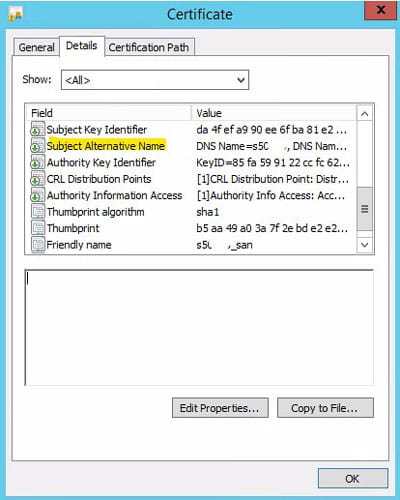
The requirements for your LDAPS certificates are actually pretty standard. It is important to note that the certificate must be created with a Subject Alternative Name. That is becoming more standard, but we’ve seen plenty of certificates that don’t have a SAN, so just make sure yours does.
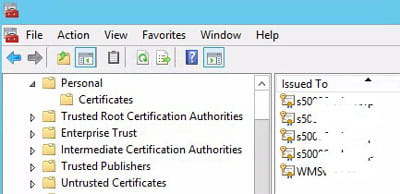
You can view the properties of your certificate in the Microsoft Management Console. You can do this on the server, or from another computer as long as you have network access to the server where the computer resides.
To view certificates in MMC, click start and search for “mmc”. Select “mmc.exe”. This will open the Microsoft Management Console. From there, click File > Add or Remove Snap-In. Choose “Certificates”. Select “Computer Account”. If you are on the server where you want to view the certificate, select “Local Computer”. Otherwise, select “Another computer” and enter the server name:
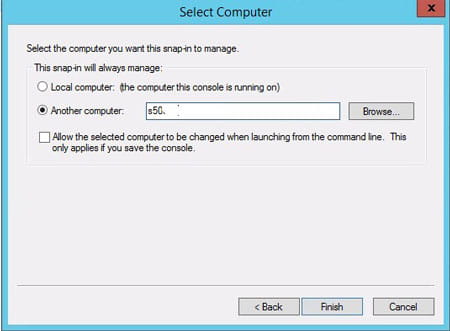
Click Finish and then Ok. The certificates for that server will populate in MMC. Typically, you will be looking in the personal store. Simply double-click on the certificate that you want to review, go to details, and look at the properties for the certificate. You can see all the properties, including the Subject Alternative Name.
Retiring Lawson, PeopleSoft, or Oracle? APIX archives the entire application — every table, every year, attachments and security included — into your own AWS account in about 30 days, so you can decommission the legacy system and keep full access to the history.

