
A Brief Overview into the Lawson Requisition and Approval Process
Lawson allows for requester users to submit requisition orders for their organization. To make sure the orders are valid, Lawson also supports approvers to verify and approve/reject the orders.
The core of this is done by setting up Requisition Locations (RQ01) and Requisition Strings (RQ02) and having a workflow process everything in between.
Requisition Strings can be used in many different ways, but in our example it is to have individual approvers approve for a particular location. This can also be general titles like Manager, VP, etc. or however your organization wants to set it up.
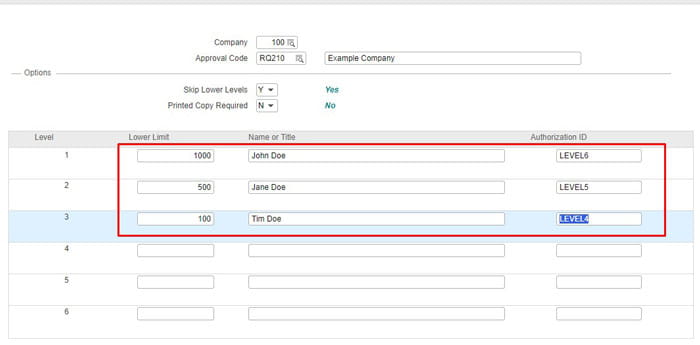
As you can see below, these are strings for Company 100, Requesting Location RQ210 with Approvers starting at Level4 and stopping at Level6. The lower limit on the left is the amount that the users approve orders for and depending on the IPA flow logic, could notify or skip them.
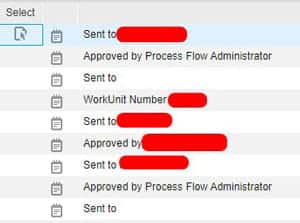
When users track requsitions in say RQ10 for example, they can drill around and see history log via the strings themselves:
This is only half the setup for this particular organization.
Approvers have to be setup on the Landmark side via Rich Client or Process Server Administrator web application. This is done via “Filters” and these have to be named accordingly to what your IPA Requisition flow will coincide with.
Below is an example of how we would mirror the RQ02 strings in Rich Client (custom report).
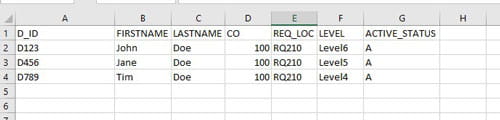
The Level 4, 5, and 6 are the “auth id” that our custom flow matches up on. It then grabs the user from Landmark and send notifications based on where the requisition is in the flow.
Some organizations simply don’t use RQ02 strings as they may find it easier to process everything on the Landmark side. Landmark does have a set of its own reporting tools and filters (See my other article titled “Generating a simple approval level report from the Landmark database“ for a custom database report I created).
The benefits of RQ02 strings in my experience is that the frontend functional users could setup the strings for the developers to mirror in the back end (or by an automated process if done right).
Hope this was helpful in giving you a brief overview of requisitions and approvers.
Retiring Lawson, PeopleSoft, or Oracle? APIX archives the entire application — every table, every year, attachments and security included — into your own AWS account in about 30 days, so you can decommission the legacy system and keep full access to the history.
