
844-NOGALIS (844-664-2547)
Nogalis, Inc.
  • Link to Facebook
  • Link to X
  • Link to LinkedIn
  • Link to Mail
  • Company
    • News, Events and Articles
    • About Us
  • Products
    • Infor Lawson Data Archive
    • PeopleSoft Data Archive
    • Oracle Data Archive
  • Services
    • Infor Lawson Support
    • Infor Lawson / CloudSuite Consulting
  • Education & Training
  • Support
  • Contact Us
  • Click to open the search input field Click to open the search input field Search
  • Menu Menu

How to check historical instances of outgoing LBI smart notifications

Articles, Frontpage Article, News

Step 1: Login to your LBI server and go to the Tools dashboard


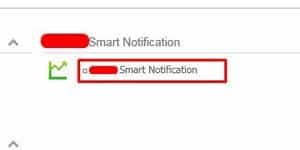
Step 2: Select the Smart Notification link
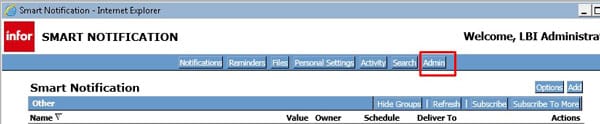
Step 3: In Smart Notification interface, click the Admin button at the top right:
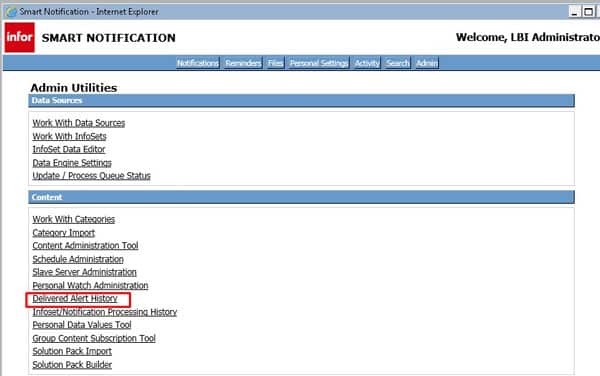
Step 4: Under Content section, select the Delivered Alert History link:
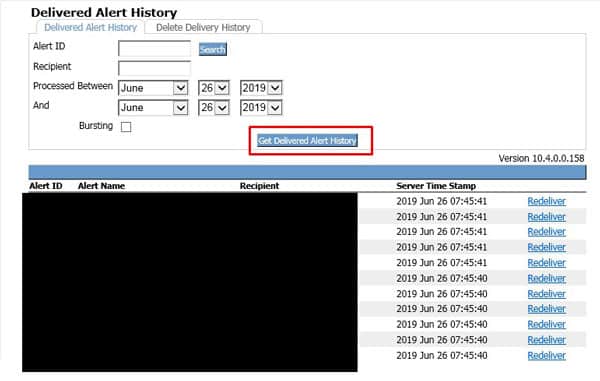
Final Step:

Select the between dates and click the “Get Delivered Alert History” button to see sent notifications. Below you’ll see all sent notifications on June 26th 2019. You can also filter down on the notifications by Alert ID and or Recipient. You can also redeliver these messages if needed.
Retiring Lawson, PeopleSoft, or Oracle? APIX archives the entire application — every table, every year, attachments and security included — into your own AWS account in about 30 days, so you can decommission the legacy system and keep full access to the history.

See how the APIX ERP archive works →

07/09/2019
Share this entry
  • Share on Facebook
  • Share on X
  • Share on WhatsApp
  • Share on LinkedIn
  • Share on Reddit
  • Share by Mail
https://www.nogalis.com/wp-content/uploads/2019/07/How-to-check-historical-instances-of-outgoing-LBI-smart-notifications.jpg 470 470 Angeli Menta https://www.nogalis.com/wp-content/uploads/2013/04/logo-with-slogan-good.png Angeli Menta2019-07-09 08:23:572019-07-08 09:40:49How to check historical instances of outgoing LBI smart notifications

LEGACY ERP DATA ARCHIVE SOLUTION


Discover how our clients are leveraging AWS services to archive their Legacy ERP data and provide ubiquitous access to users via a light-weight, secure, and read-only web interface. Secure, Fast, Reliable, and Cost Effective. That is the promise of APIX. Follow the link below to find out more and book a discovery call with our data archive specialist.

BOOK DEMO

© Copyright - Nogalis, Inc. 2026
  • Legal
  • Privacy
  • Contact Us
Link to: The Top Challenges for ERP Implementation in SMBs Link to: The Top Challenges for ERP Implementation in SMBs The Top Challenges for ERP Implementation in SMBs Link to: How to set ESS access from an external domain and for custom forms Link to: How to set ESS access from an external domain and for custom forms How to set ESS access from an external domain and for custom forms
Scroll to top Scroll to top Scroll to top