

Using the “LIMIT” Keyword in Athena Queries
When working with Amazon Athena, a common stumbling block is using LIMIT inside a subquery. Unlike many other SQL engines, Athena does not support LIMIT in scalar subqueries (those that return just one value). If you try to use it, you’ll likely see an error.
Let’s walk through an example and the solution.
The Problem
Suppose you want to query an employee distribution table and pull in the employee’s position description from another table. You might be tempted to write something like this:
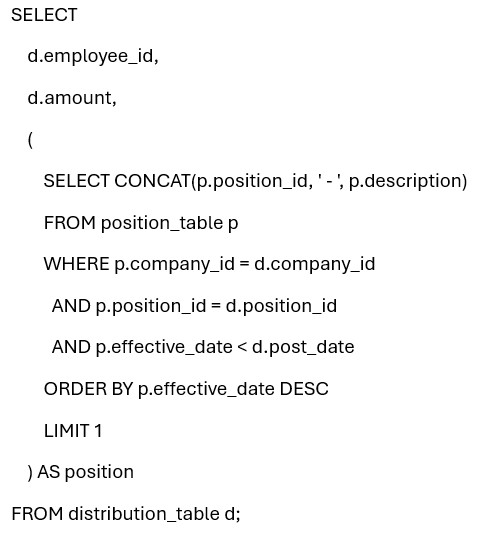
At first glance, this looks fine: grab the latest effective position for the employee. But in Athena, the ORDER BY … LIMIT 1 construct is not allowed in a subquery.
The Fix: ARRAY_AGG + ELEMENT_AT
The workaround is to use Athena’s ARRAY_AGG function with ordering, then pull out the first element of that array. This replaces LIMIT 1 safely.
Here’s the corrected version:
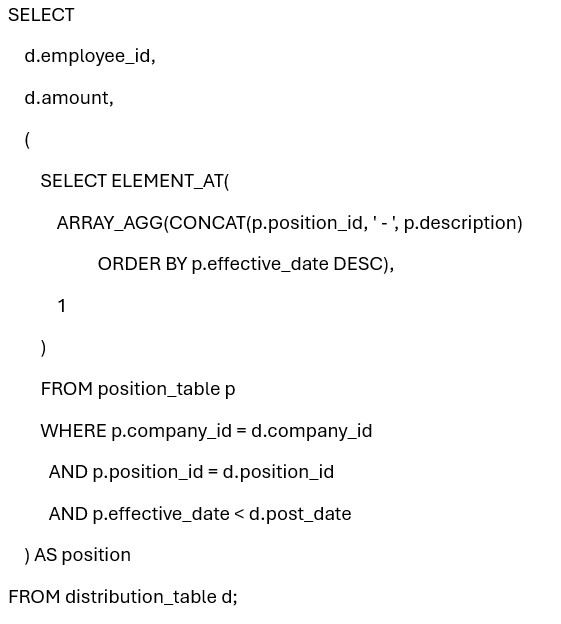
Why This Works
- ARRAY_AGG(… ORDER BY …) creates an ordered array of results.
- ELEMENT_AT(…, 1) extracts the first element, mimicking LIMIT 1.
- This pattern is fully supported in Athena.
Key Takeaways
- Athena doesn’t support LIMIT in scalar subqueries.
- Use ARRAY_AGG with an ORDER BY to sort values.
- Use ELEMENT_AT to extract the “first” or “top” value you need.
- This approach makes your queries both valid and efficient.
Whenever you run into Athena limitations around subqueries, look for array functions. They provide powerful alternatives to constructs that might be second nature in other SQL dialects.
Retiring Lawson, PeopleSoft, or Oracle? APIX archives the entire application — every table, every year, attachments and security included — into your own AWS account in about 30 days, so you can decommission the legacy system and keep full access to the history.

