

Lawson IPA Workflow email node – attachment failing on network path
Summary: You have an email node going out to users with an attachment from a network path, but it seems to be failing.
Here is the email node, notice the network path by \\
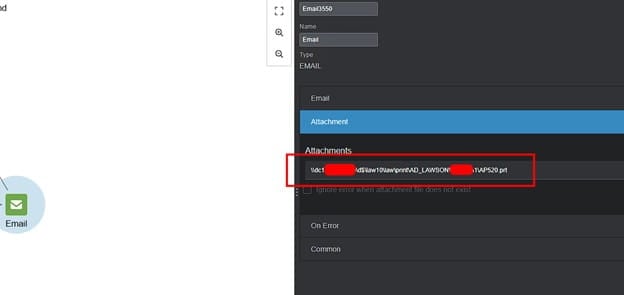
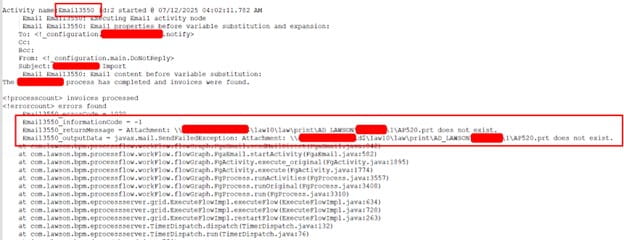
This same email node will fail when you try to add an attachment like this by saying the file “does not exist”
One way to properly attach a file to the email node is to use IPA FileAccess nodes to read and then write the file to Landmark so it could be attached locally.
- FileAccess Node 1 (read) will need to be set to the Main configuration so it can read the file from your LSF server (assuming that is where your file exists).
- FileAccess Node 2 (write) will need to be set to the System configuration so it can write it to your Landmark server. If your file will be on landmark automatically or by some other means, skip this step.
- Now simply remove your existing \\ attachment network path and add a local Landmark path like D:\lawson\fileAttachmentName.txt
Done! Now just run and test it to make sure it works.
Retiring Lawson, PeopleSoft, or Oracle? APIX archives the entire application — every table, every year, attachments and security included — into your own AWS account in about 30 days, so you can decommission the legacy system and keep full access to the history.

