844-NOGALIS (844-664-2547)
Nogalis, Inc.
  • Link to Facebook
  • Link to X
  • Link to LinkedIn
  • Link to Mail
  • Company
    • News, Events and Articles
    • About Us
  • Products
    • Infor Lawson Data Archive
    • PeopleSoft Data Archive
    • Oracle Data Archive
  • Services
    • Infor Lawson Support
    • Infor Lawson / CloudSuite Consulting
  • Education & Training
  • Support
  • Contact Us
  • Click to open the search input field Click to open the search input field Search
  • Menu Menu

Configuring LSA logging for the passive client

Articles, Frontpage Article, News

Follow the steps below to configure LSA logging for the passive client:

  1. Right mouse Click on the Lawson Security Administrator icon and run as Administrator
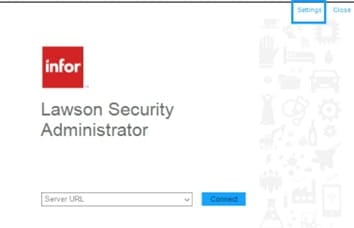
  2. On the upper right corner of the Server Connection form, click Settings.
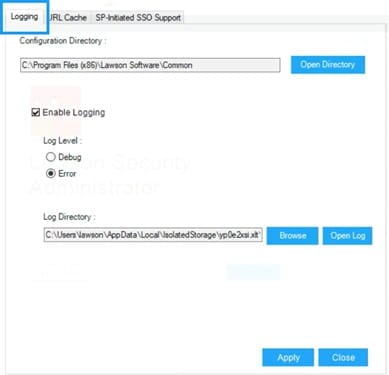
  3. On the Settings form, select the Logging tab then configure the following:

    Configuration Directory

    Specify where LawsonNlog.Config is located. LawsonNlog.Config is the configuration setting for LawsonHttpClient that takes care of logging.

    Enable Logging- toggle logging.

    Log level

    Debug – Log the detailed trace

    Error – Log the exception errors

    Log Directory

    Provide the location where the generated logs will be saved on the same computer where LSA is installed.

  4. Select Apply, and Yes – to apply the settings before re-launching LSA.
 

Retiring Lawson, PeopleSoft, or Oracle? APIX archives the entire application — every table, every year, attachments and security included — into your own AWS account in about 30 days, so you can decommission the legacy system and keep full access to the history.

See how the APIX ERP archive works →

03/31/2026
Share this entry
  • Share on Facebook
  • Share on X
  • Share on WhatsApp
  • Share on LinkedIn
  • Share on Reddit
  • Share by Mail
https://www.nogalis.com/wp-content/uploads/2026/03/Configuring-LSA-logging-for-the-passive-client.jpg 470 470 Angeli Menta https://www.nogalis.com/wp-content/uploads/2013/04/logo-with-slogan-good.png Angeli Menta2026-03-31 08:12:172026-03-25 12:15:55Configuring LSA logging for the passive client

LEGACY ERP DATA ARCHIVE SOLUTION


Discover how our clients are leveraging AWS services to archive their Legacy ERP data and provide ubiquitous access to users via a light-weight, secure, and read-only web interface. Secure, Fast, Reliable, and Cost Effective. That is the promise of APIX. Follow the link below to find out more and book a discovery call with our data archive specialist.

BOOK DEMO

© Copyright - Nogalis, Inc. 2026
  • Legal
  • Privacy
  • Contact Us
Link to: Cloud ERP vs. on-premises ERP: Key differences Link to: Cloud ERP vs. on-premises ERP: Key differences Cloud ERP vs. on-premises ERP: Key differences Link to: How Clean Core ERP Has Evolved Into a Mandate Link to: How Clean Core ERP Has Evolved Into a Mandate How Clean Core ERP Has Evolved Into a Mandate
Scroll to top Scroll to top Scroll to top