
How to update a user’s Database and User Roles via Infor Lawson Cloudsuite
Follow these steps to update a user’s Database and User Roles via Infor Lawson Cloudsuite:
- Login to your concierge account and go to Cloudsuite app (this assumes you have access to this else open a ticket with Infor).
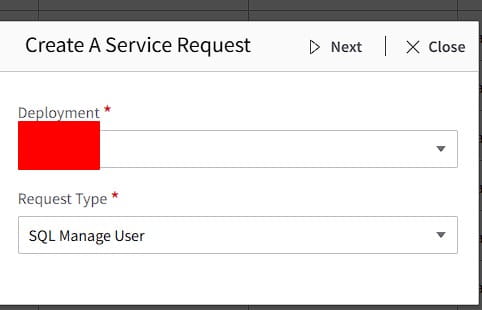
- Create a Service Request

- Select Deployment and Request Type: SQL Manage User

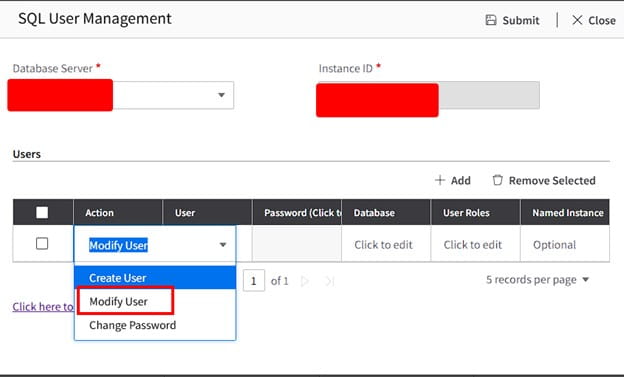
- Select Database Server and in the drop down select Modify User


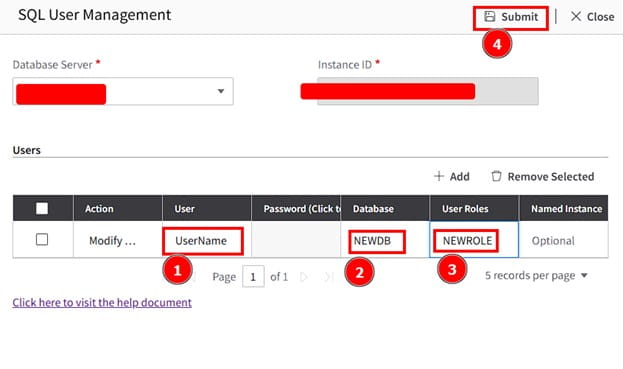
- Enter username, the new database, and new role for the user, then click Submit

All done! Validate with the user. If this is something you’re need assistance managing, Nogalis offers a team of Lawson specialists within a single MSP services contract for customers. Let us know if we can assist you today.

