IPA Memory Alert
If you are receiving an IPA (Infor Process Automation) Memory Alert of type WU Alloc when an IPA flow runs, and you have made every attempt to optimize your flow, you can increase the alert threshold. Note that this fix will only work for on-premises customers. To increase the alert threshold, you will need to open a Landmark command window and run the following command:
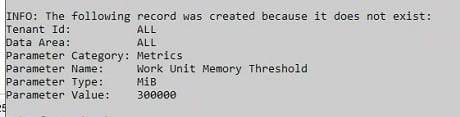
paadm cfgprm update –tenant ALL –dataarea ALL –category Metrics –name “Work Unit Memory Threshold” –type MiB –value <new threshold>

The record will either be created (if this has never been done before), or updated. It should look like the screenshot below.