

Start a Clean Compile of all Lawson Programs
This article will demonstrate how to clear out a Lawson system so that you can start a completely fresh compile of the full productline.
First, open a command line utility with the Lawson environment variables set. Then, navigate to LAWDIR\<pdl>.
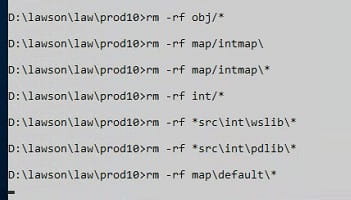
Next, run the following command: rm -rf on the following directories (for visual reference, look at the screenshot below and make sure that your screen matches all of the commands):
- obj\*
- map\default\*
- map\intmap\*
- int\*
- *src\int\wslib\*
- *src\int\pdlib\*
- sdlib\*
Finally, run the command combcmp <pdl>. If everything was run correctly, then this will recompile every program in the productline and create fresh compiled code.

