
RMI Connection Errors
If you are getting a connection timeout when trying to run certain nodes in IPA, it could be due to your firewall blocking port.
Look for the following error message in your work unit log:
Failed with error com.lawson.bpm.db.model.helper.LawsonDBException: java.rmi.ConnectException: Connection refused to host: <ip address>; nested exception is:
java.net.ConnectException: Connection timed out: connect
RMI expects to work over the ephemeral port range, which is typically 49152 to 65535. If you do a telnet from your Landmark to Lawson server over one of those ports, and you get a timeout error, this is likely because your network admin has closed off all ports between those servers, besides the ones specified. In this case, you need to tell Lawson which port it is going to use for RMI.
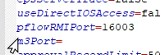
In LAWDIR/system/bpm.properties, set the pflowRMIPort value to the specified port (0 is all ports). Make sure this port is also opened between the Lawson & Landmark servers by your network admin.
Reboot the Lawson server or restart services.

