
844-NOGALIS (844-664-2547)
Nogalis, Inc.
  • Link to Facebook
  • Link to X
  • Link to LinkedIn
  • Link to Mail
  • Company
    • News, Events and Articles
    • About Us
  • Products
    • Infor Lawson Data Archive
    • PeopleSoft Data Archive
    • Oracle Data Archive
  • Services
    • Infor Lawson Support
    • Infor Lawson / CloudSuite Consulting
  • Education & Training
  • Support
  • Contact Us
  • Click to open the search input field Click to open the search input field Search
  • Menu Menu

ujobload fails in lawappinstall activate

Articles, Frontpage Article, News

During patch install, if customizations exist, the activate will fail on ujobload

lawappinstall ACTIVATE installation started at 11/14/2024 15:48:00 for the following deliverables: PATCH121887.57 PATCH121211.58 PATCH126341.59.
command line = ‘E:\lawson\gen/bin/lawappinstall activate test10’.
11/14/2024 15:48:03 Bypassing Database preparation. Already successful.
11/14/2024 15:48:03 Bypassing blddbdict. Already successful.
11/14/2024 15:48:03 Executing dbreorg listing.
11/14/2024 15:48:03 dbreorg listing execution successful.
11/14/2024 15:48:03 Database change confirmation.
11/14/2024 15:48:07 Database change confirmation successful.
11/14/2024 15:48:07 Database reorganization confirmation.
11/14/2024 15:48:09 Database reorganization confirmation successful.
11/14/2024 15:48:09 Executing dbreorg.
11/14/2024 15:48:09 dbreorg execution successful.
11/14/2024 15:48:10 Executing ujobdump for TEST10.
11/14/2024 15:48:10 ujobdump execution successful.
11/14/2024 15:48:10 Executing ujobload for TEST10.
11/14/2024 15:48:10 ERROR – ujobload failed.


Resolution:
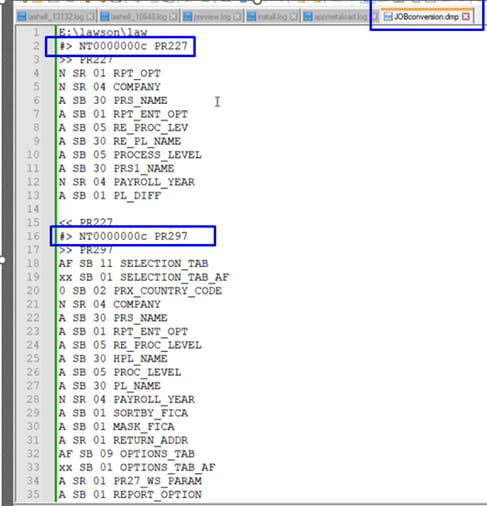
Review the lawdir/prodline/backup/ACTIVATEstage/JOBconversion.dmp file for user jobs that need to be deleted from jobdef.

  1. open up that dmp file and see what the actual job names are.
    Look for #> NTID JobName
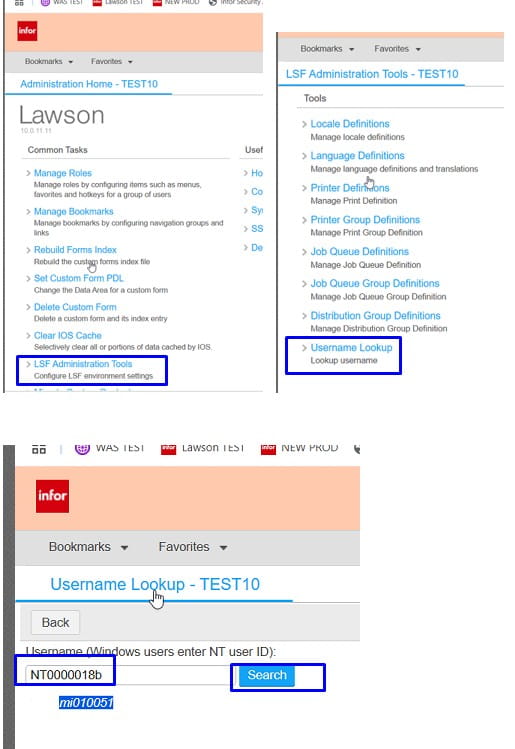
  2. Look up the username for each of the NTID
    In portal, under LSF Administrator Tools, username lookup
  3. Go into jobdef and delete the job that it is failing on for each user.
  4. Once jobs have been deleted, run lawappinstall activate again and it should now complete successfully.
 

Retiring Lawson, PeopleSoft, or Oracle? APIX archives the entire application — every table, every year, attachments and security included — into your own AWS account in about 30 days, so you can decommission the legacy system and keep full access to the history.

See how the APIX ERP archive works →

07/15/2025
Share this entry
  • Share on Facebook
  • Share on X
  • Share on WhatsApp
  • Share on LinkedIn
  • Share on Reddit
  • Share by Mail
https://www.nogalis.com/wp-content/uploads/2025/07/ujobload-fails-in-lawappinstall-activate.jpg 470 470 Angeli Menta https://www.nogalis.com/wp-content/uploads/2013/04/logo-with-slogan-good.png Angeli Menta2025-07-15 09:59:382026-09-11 11:46:55ujobload fails in lawappinstall activate

LEGACY ERP DATA ARCHIVE SOLUTION


Discover how our clients are leveraging AWS services to archive their Legacy ERP data and provide ubiquitous access to users via a light-weight, secure, and read-only web interface. Secure, Fast, Reliable, and Cost Effective. That is the promise of APIX. Follow the link below to find out more and book a discovery call with our data archive specialist.

BOOK DEMO

© Copyright - Nogalis, Inc. 2026
  • Legal
  • Privacy
  • Contact Us
Link to: Upcoming Events August 2025 Link to: Upcoming Events August 2025 Upcoming Events August 2025 Link to: Infor Announces Strategic Collaboration with Amazon Web Services (AWS) to Propel Generative AI Innovations Link to: Infor Announces Strategic Collaboration with Amazon Web Services (AWS) to Propel Generative AI Innovations Infor Announces Strategic Collaboration with Amazon Web Services (AWS) to Propel...
Scroll to top Scroll to top Scroll to top