ujobload fails in lawappinstall activate
During patch install, if customizations exist, the activate will fail on ujobload
lawappinstall ACTIVATE installation started at 11/14/2024 15:48:00 for the following deliverables: PATCH121887.57 PATCH121211.58 PATCH126341.59.
command line = ‘E:\lawson\gen/bin/lawappinstall activate test10’.
11/14/2024 15:48:03 Bypassing Database preparation. Already successful.
11/14/2024 15:48:03 Bypassing blddbdict. Already successful.
11/14/2024 15:48:03 Executing dbreorg listing.
11/14/2024 15:48:03 dbreorg listing execution successful.
11/14/2024 15:48:03 Database change confirmation.
11/14/2024 15:48:07 Database change confirmation successful.
11/14/2024 15:48:07 Database reorganization confirmation.
11/14/2024 15:48:09 Database reorganization confirmation successful.
11/14/2024 15:48:09 Executing dbreorg.
11/14/2024 15:48:09 dbreorg execution successful.
11/14/2024 15:48:10 Executing ujobdump for TEST10.
11/14/2024 15:48:10 ujobdump execution successful.
11/14/2024 15:48:10 Executing ujobload for TEST10.
11/14/2024 15:48:10 ERROR – ujobload failed.
Resolution:
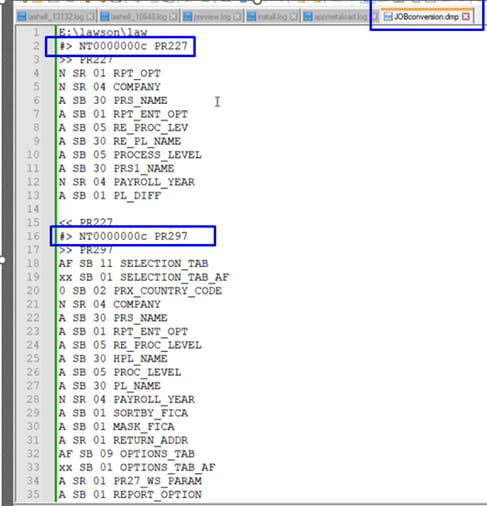
Review the lawdir/prodline/backup/ACTIVATEstage/JOBconversion.dmp file for user jobs that need to be deleted from jobdef.
- open up that dmp file and see what the actual job names are.
Look for #> NTID JobName

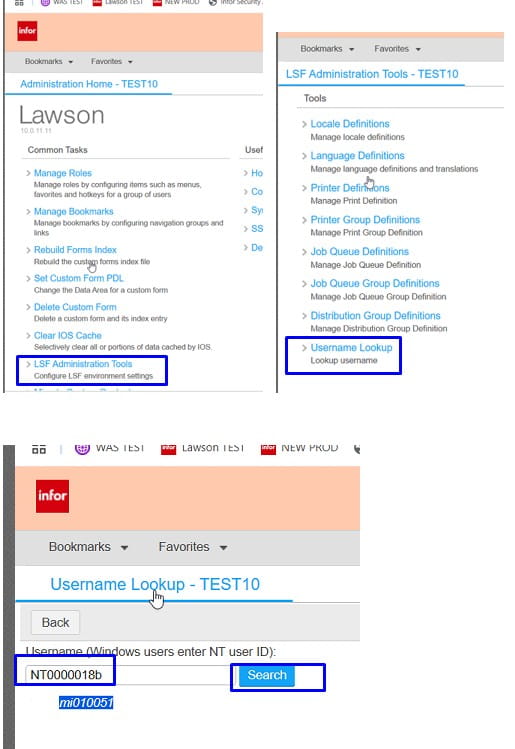
- Look up the username for each of the NTID
In portal, under LSF Administrator Tools, username lookup

- Go into jobdef and delete the job that it is failing on for each user.
- Once jobs have been deleted, run lawappinstall activate again and it should now complete successfully.