
844-NOGALIS (844-664-2547)
Nogalis, Inc.
  • Link to Facebook
  • Link to X
  • Link to LinkedIn
  • Link to Mail
  • Company
    • News, Events and Articles
    • About Us
  • Products
    • Infor Lawson Data Archive
    • PeopleSoft Data Archive
    • Oracle Data Archive
  • Services
    • Infor Lawson Support
    • Infor Lawson / CloudSuite Consulting
  • Education & Training
  • Support
  • Contact Us
  • Click to open the search input field Click to open the search input field Search
  • Menu Menu

Adding Context Apps in Infor OS Portal

Articles, Frontpage Article, News

Follow the steps below to add a new context app in Infor OS Portal.  In this example, we will enable the app for Infor Lawson S3.

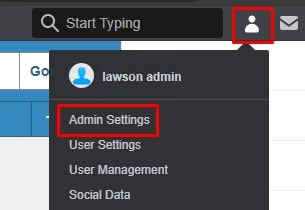
Log into Infor Portal and Click on User Settings > Admin Settings
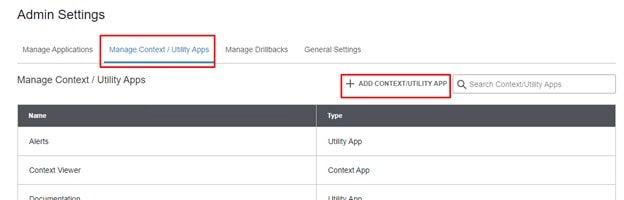
Go to the Manage Context / Utility Apps tab and select “ADD CONTEXT/UTILITY APP”
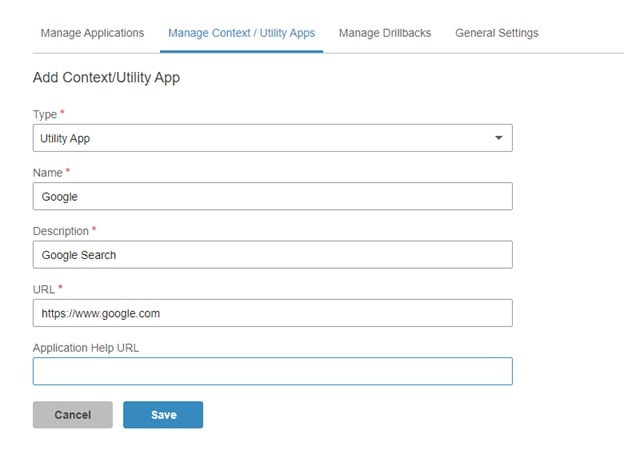
Enter a Type, Name, Description, and URL.  Click Save.
 

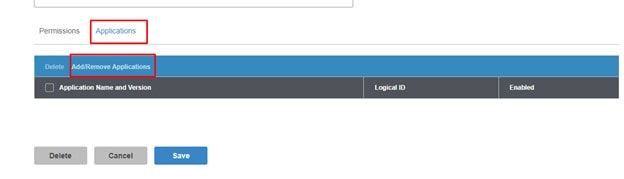
Now, add the application(s) that will be using this context app.  At the bottom of the screen, select the Applications tab and select “Add/Remove Applications”.
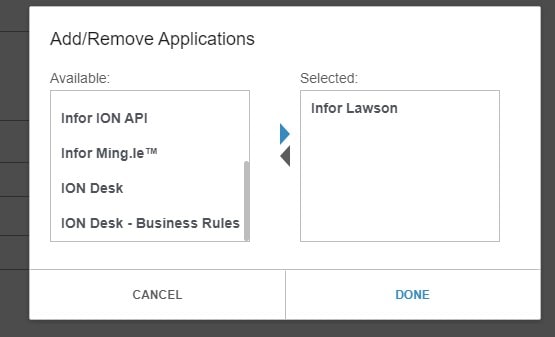
Select the application(s) and click Done
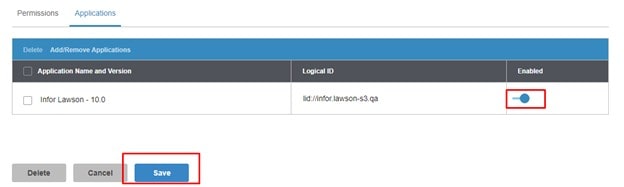
Be sure to Enable to application and then click “Save”
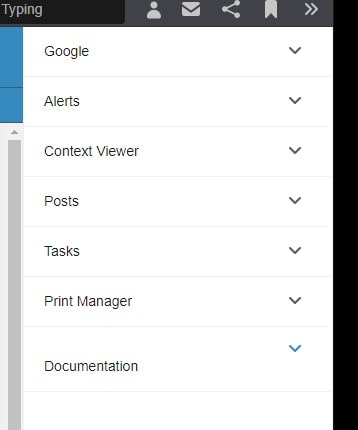
Your context app now shows up in the right side menu
 

Retiring Lawson, PeopleSoft, or Oracle? APIX archives the entire application — every table, every year, attachments and security included — into your own AWS account in about 30 days, so you can decommission the legacy system and keep full access to the history.

See how the APIX ERP archive works →

05/02/2025
Share this entry
  • Share on Facebook
  • Share on X
  • Share on WhatsApp
  • Share on LinkedIn
  • Share on Reddit
  • Share by Mail
https://www.nogalis.com/wp-content/uploads/2025/04/Adding-Context-Apps-in-Infor-OS-Portal.jpg 470 470 Angeli Menta https://www.nogalis.com/wp-content/uploads/2013/04/logo-with-slogan-good.png Angeli Menta2025-05-02 08:05:082025-04-30 11:07:42Adding Context Apps in Infor OS Portal
0 replies

Leave a Reply

Want to join the discussion?
Feel free to contribute!

Leave a Reply

You must be logged in to post a comment.

LEGACY ERP DATA ARCHIVE SOLUTION


Discover how our clients are leveraging AWS services to archive their Legacy ERP data and provide ubiquitous access to users via a light-weight, secure, and read-only web interface. Secure, Fast, Reliable, and Cost Effective. That is the promise of APIX. Follow the link below to find out more and book a discovery call with our data archive specialist.

BOOK DEMO

© Copyright - Nogalis, Inc. 2026
  • Legal
  • Privacy
  • Contact Us
Link to: Taming the Data Monster: Why Getting Your Data Ready is Key to Gen AI Success Link to: Taming the Data Monster: Why Getting Your Data Ready is Key to Gen AI Success Taming the Data Monster: Why Getting Your Data Ready is Key to Gen AI Succe... Link to: Weekly Patch Notification: May 3, 2025 Link to: Weekly Patch Notification: May 3, 2025 Weekly Patch Notification: May 3, 2025
Scroll to top Scroll to top Scroll to top