844-NOGALIS (844-664-2547)
Nogalis, Inc.
  • Link to Facebook
  • Link to X
  • Link to LinkedIn
  • Link to Mail
  • Company
    • News, Events and Articles
    • About Us
  • Products
    • Infor Lawson Data Archive
    • PeopleSoft Data Archive
    • Oracle Data Archive
  • Services
    • Infor Lawson Support
    • Infor Lawson / CloudSuite Consulting
  • Education & Training
  • Support
  • Contact Us
  • Click to open the search input field Click to open the search input field Search
  • Menu Menu

How to add a read-only SQL database user via Infor Cloudsuite

Articles, Frontpage Article, News

With Infor Cloudsuite’s SQL Manage User Service, there is no need to setup any DBA permissions or to use database management software. You can simply add a read-only database user via Cloudsuite in the below steps.


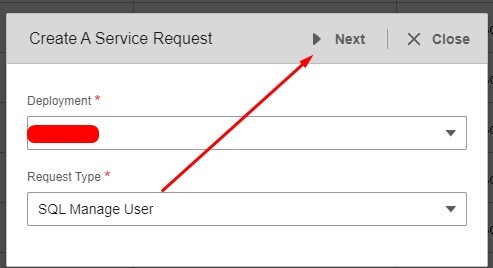
  1. Login to Infor Cloudsuite and go to the Service Request tab, then click Create a Service Request
  2. Select Deployment and Request Type: SQL Manage User >> Next
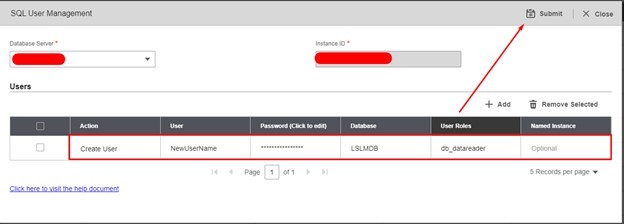
  3. Select the Database Server, fill in the User, Password, Database name and for our example we are using the default database roles, for read-only, use db_datareader. See all default SQL database roles here and then click Submit!


 

NOTE: Some organizations have minimum password requirements. We recommend using a password generator online and keeping it to letters and numbers so users can type in relatively easy.

If you found this article helpful and need support managing your Infor Cloudsuite or Lawson Database processes, Nogalis provides expert managed services to simplify and optimize your system. From resolving issues like database user management to maintaining/optimizing existing processes, our team is equipped to deliver the assistance you need—without the cost and commitment of a full-time, in-house staff. Contact us to learn more about how we can help streamline your Lawson environment.

Retiring Lawson, PeopleSoft, or Oracle? APIX archives the entire application — every table, every year, attachments and security included — into your own AWS account in about 30 days, so you can decommission the legacy system and keep full access to the history.

See how the APIX ERP archive works →

03/07/2025
Share this entry
  • Share on Facebook
  • Share on X
  • Share on WhatsApp
  • Share on LinkedIn
  • Share on Reddit
  • Share by Mail
https://www.nogalis.com/wp-content/uploads/2022/01/How-to-add-a-read-only-SQL-database-user-via-Infor-Cloudsuite.jpg 470 470 Angeli Menta https://www.nogalis.com/wp-content/uploads/2013/04/logo-with-slogan-good.png Angeli Menta2025-03-07 08:33:452026-09-11 12:09:58How to add a read-only SQL database user via Infor Cloudsuite

LEGACY ERP DATA ARCHIVE SOLUTION


Discover how our clients are leveraging AWS services to archive their Legacy ERP data and provide ubiquitous access to users via a light-weight, secure, and read-only web interface. Secure, Fast, Reliable, and Cost Effective. That is the promise of APIX. Follow the link below to find out more and book a discovery call with our data archive specialist.

BOOK DEMO

© Copyright - Nogalis, Inc. 2026
  • Legal
  • Privacy
  • Contact Us
Link to: Planning ahead around data migrations Link to: Planning ahead around data migrations Planning ahead around data migrations Link to: Weekly Patch Notification: March 8, 2025 Link to: Weekly Patch Notification: March 8, 2025 Weekly Patch Notification: March 8, 2025
Scroll to top Scroll to top Scroll to top