
844-NOGALIS (844-664-2547)
Nogalis, Inc.
  • Link to Facebook
  • Link to X
  • Link to LinkedIn
  • Link to Mail
  • Company
    • News, Events and Articles
    • About Us
  • Products
    • Infor Lawson Data Archive
    • PeopleSoft Data Archive
    • Oracle Data Archive
  • Services
    • Infor Lawson Support
    • Infor Lawson / CloudSuite Consulting
  • Education & Training
  • Support
  • Contact Us
  • Click to open the search input field Click to open the search input field Search
  • Menu Menu

How to run AC290 for more than 6 activities in Lawson

Articles, Frontpage Article, News

Summary: Below is a helpful guide if you’re having issues running AC290 for more than 6 activities.


First create an activity list, so on AC290 right-click inside the Activity List field and select “Define”.
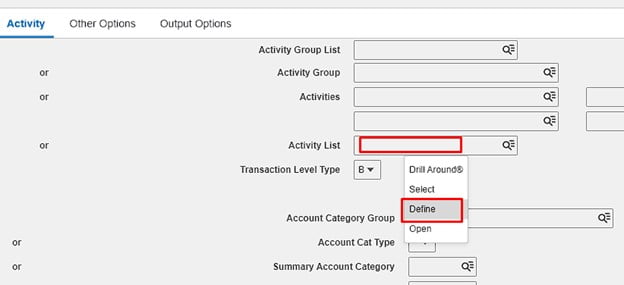
 

This will take you to MX10.1, click new list:
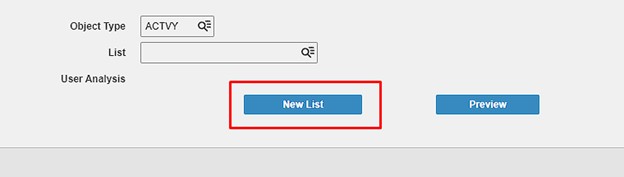
 

This takes you to MX10.2, Create your list name, add it, and go back to MX10.1
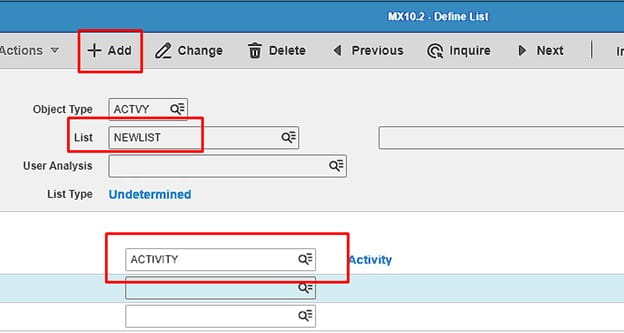
 

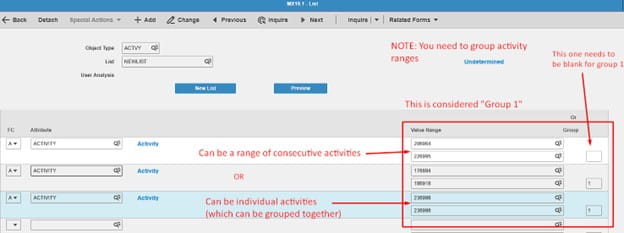
On MX10.1, inquire on your list and add in activities, this can be a range or individual. You’ll need to group them if they are ranges, all shown below.
 

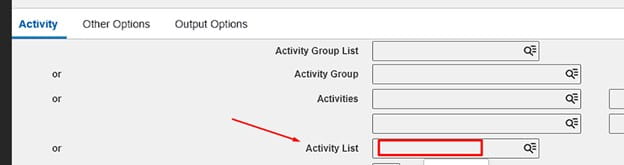
Now go back to AC290, enter the list you created under Acivity List:
 

Hope this was helpful!

Retiring Lawson, PeopleSoft, or Oracle? APIX archives the entire application — every table, every year, attachments and security included — into your own AWS account in about 30 days, so you can decommission the legacy system and keep full access to the history.

See how the APIX ERP archive works →

02/28/2025
Share this entry
  • Share on Facebook
  • Share on X
  • Share on WhatsApp
  • Share on LinkedIn
  • Share on Reddit
  • Share by Mail
https://www.nogalis.com/wp-content/uploads/2025/02/How-to-run-AC290-for-more-than-6-activities-in-Lawson.jpg 470 470 Angeli Menta https://www.nogalis.com/wp-content/uploads/2013/04/logo-with-slogan-good.png Angeli Menta2025-02-28 08:26:182025-02-27 17:30:41How to run AC290 for more than 6 activities in Lawson
0 replies

Leave a Reply

Want to join the discussion?
Feel free to contribute!

Leave a Reply

You must be logged in to post a comment.

LEGACY ERP DATA ARCHIVE SOLUTION


Discover how our clients are leveraging AWS services to archive their Legacy ERP data and provide ubiquitous access to users via a light-weight, secure, and read-only web interface. Secure, Fast, Reliable, and Cost Effective. That is the promise of APIX. Follow the link below to find out more and book a discovery call with our data archive specialist.

BOOK DEMO

© Copyright - Nogalis, Inc. 2026
  • Legal
  • Privacy
  • Contact Us
Link to: Why cloud ERP adoption isn’t as simple as it seems Link to: Why cloud ERP adoption isn’t as simple as it seems Why cloud ERP adoption isn’t as simple as it seems Link to: Weekly Patch Notification: March 1, 2025 Link to: Weekly Patch Notification: March 1, 2025 Weekly Patch Notification: March 1, 2025
Scroll to top Scroll to top Scroll to top