
Fixing a Scheduled LBI Report Instance Parameters
Often times a user is responsible for updating dozens of LBI report schedules that generate daily, weekly, and monthly report instances.
A parameter might have been set incorrectly and is now generating the incorrect data for a bunch of instanced reports that now are useless and no one noticed until several report instances existed.
Today we are going to go over how to easily fix those report instances assuming one has admin access and crystal reports installed.
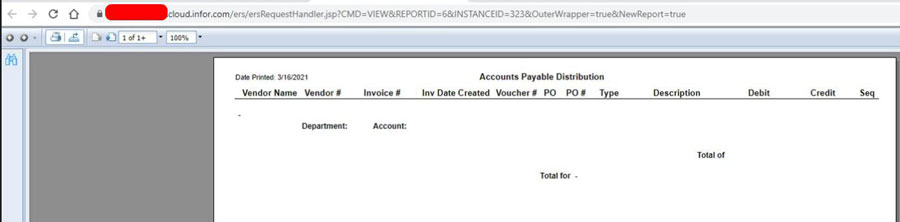
Here is an example of a report a user was viewing that contains no bursting data for that user because it has the incorrect parameters:
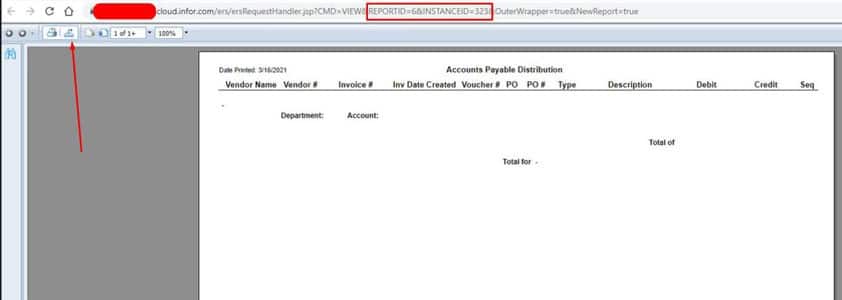
First thing to note is the Report ID and Instanced ID as highlighted below.
Let’s now export the report as a Crystal report as shown by the arrow below.
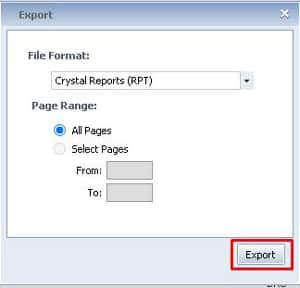
Open the exported report in Crystal and press F5 >> Prompt for new parameter values >> OK
This should pull up the incorrect saved parameters. Change it to the proper values and press OK to generated the report with data. (you may be prompted for credentials, you’ll need some sort of db read access).
After the data is generated go to File >> Save and make sure “Save Data with Report” is highlighted:
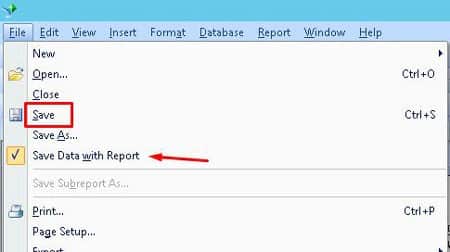
Now go to the report instance that you exported this from and click details:
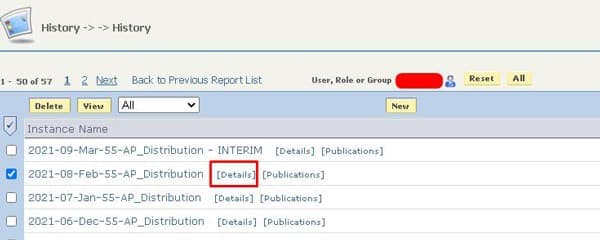
Under Report Actions >> Republish >> Choose File >> Find the updated crystal report, select >> Save
Now view the report again and see if it shows the correct data. Do this for the rest of the reports.
Numerous organizations choose to leverage Lawson consultant teams to oversee their Lawson Security and LBI systems. These expert teams provide managed services at a predictable monthly rate, offering extensive knowledge and specialized expertise. This solution is ideal for larger organizations, while smaller entities seeking efficient management without the need for full-time on-site staff can also benefit. Nogalis delivers these services, and additional details can be obtained by contacting us through our dedicated contact page.
Retiring Lawson, PeopleSoft, or Oracle? APIX archives the entire application — every table, every year, attachments and security included — into your own AWS account in about 30 days, so you can decommission the legacy system and keep full access to the history.

